How We Built the Fastest, Cheapest Browser Agent with Jev
IronBee Express runs a nine-action checkout in 6.7 seconds for $0.0005 in model cost. Here is what we ask Jev, what we show it, how it judges a run, and when we hand the wheel to an LLM.

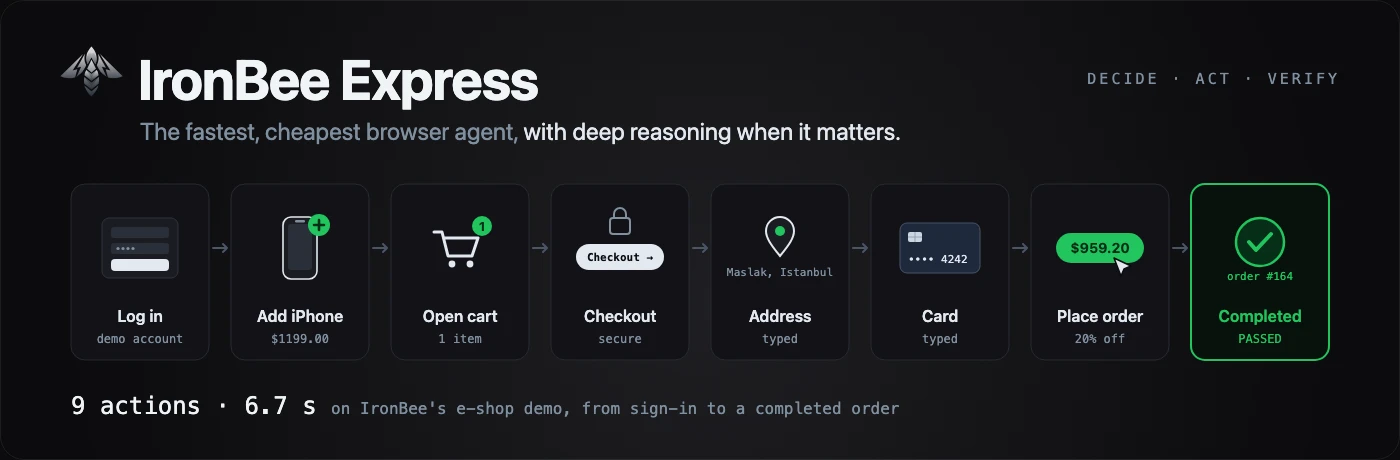

The clip above is a real run at normal speed. IronBee Express signs in to our demo shop, buys an iPhone 15 Pro with an address and a card, and waits until the order page says COMPLETED. Nine actions, 6.7 seconds.
The decision engine, Jev, cost $0.00054 for that whole run. That includes the review at the end.
There is no LLM in that loop. Every step is one call to Jev, a model that picks from a list of options and gives a probability for each. It doesn't write text and it doesn't look at screenshots. That covers most of what a browser agent does, and a step takes about 300 ms.
Speed is the easy part to show. The part I care more about is this run of the same checkout:
  8 +5.34s ✓ CLICK [23] button "Place order — $ 311.10"  [p=0.98 decide 298ms act 1143ms]
  9 +6.80s ✗ DONE  [p=0.74 decide 323ms]  (the goal failed (p=0.83); the evidence shows GET /api/orders/131 → 200)

FAILED in 7.57s — 8 actions, 9 decisions
…
FAILED — the goal was not reached: notification-service: … Order #131 Could Not Be Processed. Reason: Insufficient inventory
The page said "Order placed successfully!". The order API answered 200, but the order inside it said FAILED. Express failed the run, pointed at that response, and then at the backend log that says why. Nobody wrote an assertion for any of it.
This post is about how we got there. What we ask Jev, what we show it, how it judges a run, how we replay a run without it, and when we hand the wheel to an LLM. Most of it is about things that broke. All numbers come from our own runs between September 21 and October 1, 2026.
Why a classifier
Jev picks. It never writes. Almost everything good about Express comes from that.
Jev is a model from TypeSafe that answers typed questions. You send it a state, which is any JSON you like, and a set of questions. Each question is a choice: a few options, each with a short description. Jev sends back the option it picked, a probability for every option, and a confidence.
This is one question from a real step, trimmed:
"operation": {
  "type": "choice",
  "criteria": {
    "CLICK": "Click an element: a button, link, tab, menu item, checkbox, radio, suggestion or date.",
    "TYPE_TEXT": "Type into an editable field, replacing its contents, using one of the available values.",
    "WAIT": "Wait: a submitted action or the page is still loading.",
    "DONE": "Every requirement of the goal is satisfied: on the current page, or by what the recent actions already did."
  },
  "instructions": { "goal": "Log in, add the iPhone 15 Pro to the cart, then open the cart", "rules": ["…"] }
}
And the answer: { "choice": "CLICK", "probabilities": { "CLICK": 0.97, … }, "confidence": … }.
Three things follow from this, and they are the whole reason we built on it:
- It's fast. No tokens are generated, so a decision is about 300 ms from Turkey. Most of that is the trip to the server. More on that below.
- It's cheap. Input is $0.042 per million tokens and output is free. A full replayed checkout, judging and review included, came to $0.00054.
- It can't make things up. The answer is a key from the list we sent. We check it against that list and map it back to a control. Model output never becomes a selector, a coordinate or a script, so a run can only click what was on the screen.
The browser side is IronBee DevTools. Each step it gives us a numbered list of the controls on the screen, then runs the action we picked and returns the next list. I'll mostly skip its internals here.
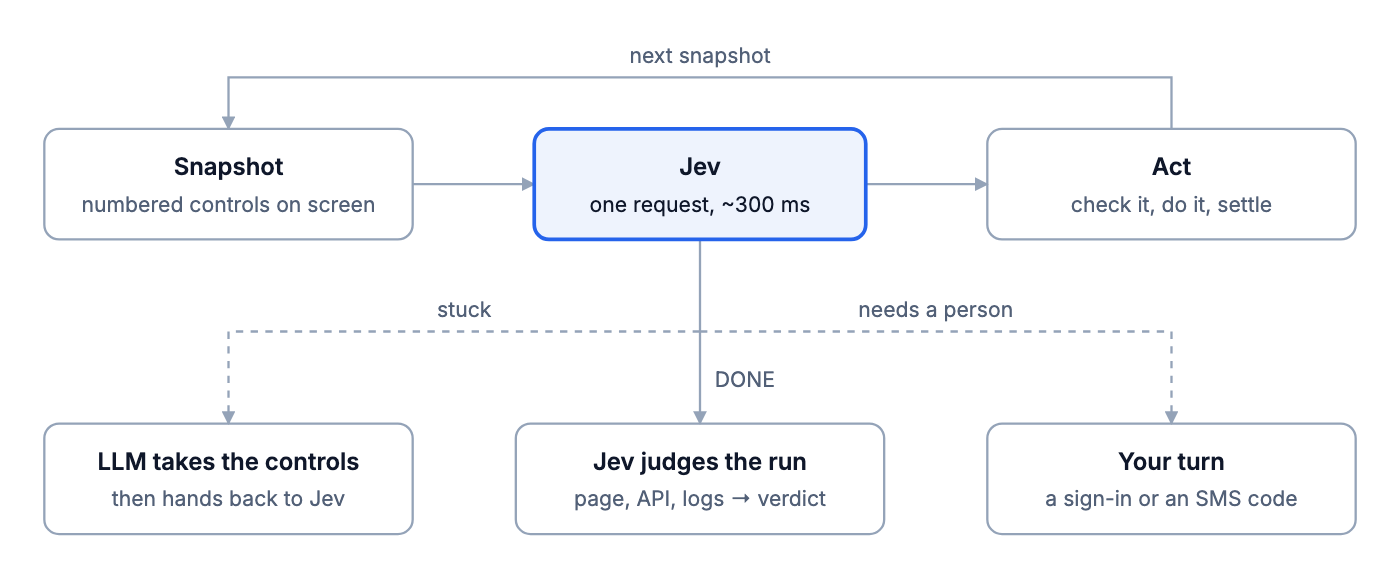
The first version ran on September 24. It signed in and added a product to the cart 3 times out of 3, in 2.85 to 3.05 s. Jev's decisions took 250 to 310 ms each, the browser actions 21 to 48 ms. Then we tried harder sites, and the rest of this post happened.
One step, one request
A step needs two answers: what to do, and what to do it to. We get both from one request.
If you ask in order, a step costs two or three round trips. First "what should I do?". If the answer is "type", then "into which field?", then "which value?". At about 300 ms each, that's up to a second per step.
So we ask everything at once. A step on the checkout page sends questions like these, trimmed:
operation         CLICK · TYPE_TEXT · SELECT · PRESS_ENTER · WAIT · DONE · …
click_target      [23] button "Place order — $ 311.10" · [8] button "Cart" · …
type_text_target  [20] textbox "Full delivery address" · [21] textbox "Card number"
text_value        value:address · secret:card · …
Jev answers all of them in the same call. If operation comes back as TYPE_TEXT, we use type_text_target and text_value and throw the rest away. The target questions are a bet: we ask for the target of every operation before we know which one wins. Jev works on the questions in parallel, and a full step still came back in about 300 ms.
In code it's short (simplified):
const answers = await engine.ask(state, questions);        // one request
const op = validateChoice(answers.operation, operations);  // must be a key we offered
const head = heads[op.choice];                            // e.g. "type_text_target"
const target = validateChoice(answers[head], offeredIds); // only the chosen head is checked
This design has two side effects, and we hit both.
The questions can't see each other. text_value is answered without knowing which field type_text_target picked. That's how a card number ended up in a PIN field. Now, when the value looks wrong for the field, we ask for it again and name the field this time. "Looks wrong" means the same text already went into another field this run, or a plain value is about to go into a password field. It costs one more request, and only in that case.
Typing replaces. Our checkout goal gave the address in three parts: street, city and postal code. The form has one "Full delivery address" field. Jev typed the three parts one after the other, each one replacing the last, and the field ended up holding "34398".
Now, when a field still shows text this run typed into it and the new text is different, we ask one more question. Each option shows the text the field will end up with, so Jev judges the result, not a rule:
field_text   REPLACE     → "34398"
             JOIN_COMMA  → "Maslak Mah. Buyukdere Cad. No:1, Istanbul, 34398"
             JOIN_SPACE  → "Maslak Mah. Buyukdere Cad. No:1, Istanbul 34398"
We first had a fourth option, KEEP. Jev picked it again and again. That wasted one to three decisions per part, and one run never typed the postal code at all. We removed it. Whether a text belongs in that field is the value question's job anyway. After that, 4 runs out of 4 typed the full address. Typing "Paris" over "Amsterdam" in a search box replaced it 2 times out of 2, with no joining.
One more detail: when a page is too big for one request, Jev answers max_tokens_exceeded. We ask again with half of the page, then a quarter.
Where the time goes, and what a run costs
From Turkey, about 215 ms of each ~300 ms decision is the round trip to Jev's servers in Oregon. Most of our latency work was about paying that trip once per decision, and not more.
| From Turkey to | Round trip |
|---|---|
| Jev (AWS, Oregon) | ~215 ms |
| A new connection to Jev (TCP and TLS) | ~450 ms extra |
| Our e-shop demo (Oregon) | ~217 ms |
| Wikipedia (Marseille) | ~71 ms |
| Google Flights (nearest edge) | ~28 ms |
Node's built-in fetch closes an idle connection after 4 seconds. Between two decisions there is often more than that: a page loading, or an LLM writing a value. So the next decision paid for a new handshake, about 450 ms.
We moved every call to Jev, and to the LLM APIs, onto one HTTP/2 pool that keeps a connection open for a minute. We also open that connection while the first page is still loading. The first decision went from about 1,000 ms to about 300 ms.
// undici
const agent = new Agent({
    allowH2: true,
    keepAliveTimeout: 60_000,
    keepAliveMaxTimeout: 600_000,
});
This is how one Google Flights run went from 26.1 s to about 8 s:
- 26.1 s. The first run used an LLM, the Claude Code CLI, to write five field values. Each one took 3 to 4.8 s.
- 13.3 s. We put the values in quotes in the goal. Jev picks a quoted value like any other option, so no LLM is called.
- About 8 s. We stopped Jev from waiting for nothing (next section) and kept the connection warm.
That leaves a floor. In one 7.7 s run we counted about 18 decisions. 18 × 215 ms is about 3.9 s, half of the run, spent on the wire. Only running closer to Jev removes that.
To see the cost, we put a small proxy between Express and Jev. It passes every request through and writes down the token counts in Jev's answer. Then TYPESAFE_URL points at it:
http.createServer((req, res) => {
    let body = "";
    req.on("data", (c) => (body += c));
    req.on("end", async () => {
        const upstream = await fetch(JEV_URL, {
            method: "POST",
            headers: { "content-type": "application/json", authorization: req.headers.authorization },
            body,
        });
        const text = await upstream.text();
        const usage = JSON.parse(text).usage ?? {};
        fs.appendFileSync(LOG, JSON.stringify({ at: Date.now(), status: upstream.status, ...usage }) + "\n");
        res.writeHead(upstream.status, { "content-type": "application/json" }).end(text);
    });
}).listen(4466);
The replayed checkout at the top of this post made three billed calls:
| Call | Input tokens | Cost |
|---|---|---|
| Goal check after the last step: not done yet, the order was still processing | 4,074 | $0.000171 |
| Goal check again: done | 4,362 | $0.000183 |
| Review after the run | 4,362 | $0.000183 |
| Total | 12,798 | $0.000538 |
Output tokens are free. The counter in the clip rises evenly so it's easy to follow; in reality these calls happen at the end of the run.
A replay asks Jev for no step decisions, so it's the cheap case. An explored run adds one call per step. We measured that on October 1 with our 20-action example: sign in, add twelve products, open the cart, remove four. With Jev deciding every step, the run took 12.1 s and passed. It made 23 billed calls: 21 step decisions, the goal check at DONE, and the review.
That came to 99,144 input tokens, or $0.0042 for the whole run. A call was 3,726 to 4,989 tokens, about $0.00018 each. Replayed from its recording, the same run takes about 4 s and makes no step decisions at all.
Put it in the option, not in the instructions
With an LLM you fix behavior by adding rules to the prompt. With Jev that made things worse. What works is changing the text of the option itself.
We tried the prompt way first. We wrote five general rules into the instructions, things like "pick the departure date before the return date" and "filling a field is not the same as submitting the form". Then we ran each version 3 times:
| Without the rules | With the rules | |
|---|---|---|
| Google Flights, median time | 8.11 s | 9.66 s |
| Google Flights, decisions per run | 17–19 | 21–25 |
| Wikipedia, median time | 2.63 s | 2.49 s |
Slower on Flights, no real change on Wikipedia. We took the rules out.
What did work was putting the information into the option the decision is about. The WAIT option normally reads:
WAIT: Wait: a submitted action or the page is still loading.
After two WAITs in a row that changed nothing, the same option reads:
WAIT: Wait: a submitted action or the page is still loading. The last 2 WAITs changed
nothing: nothing is loading. A visible control that advances the goal is the better choice.
A Google Flights run that used to wait 8 times in a row now waits 3 times at most. The same trick shows up in a few other places:
- A click that changed nothing. That control drops out of the CLICK list until the page changes. It stays in the HOVER list, marked "clicking it changed nothing", because some menus only open on hover.
- A value with a description. With
--value-desc card="the payment card number", the option Jev sees becomescard (secret, value hidden) — the payment card number. Jev can now match it to a field whose label looks nothing like "card", and no LLM is asked. - A DONE that was turned down. The judge's reason goes into the history the next decision reads, next to the action it's about.
Our reading is that Jev weighs each option by its own text. So that's where guidance has to go.
What Jev needs to see
Jev only knows what's in the request. Most of our "Jev made a dumb choice" bugs turned out to be "we didn't show Jev what it needed".
Only what's on the screen, and enough to tell twins apart. The demo shop has twelve "Add to cart" buttons. Twelve identical options are a coin toss. So each one carries the text of its product card:
[11] button "Add to cart" (Electronics In stock MacBook Pro 14" Apple M3 Pro chip, 18G…)
When there's no text around a control, like the bare checkboxes on a component library's demo page, we use the heading above it and its position: Basic checkboxes · 1/2. On MUI's demo page that took a task from 0 of 3 runs to 3 of 3.
We also tried giving Jev the page's whole accessibility tree instead. On IKEA that's about 300 controls, while about 28 are on the screen, and twins come with weaker context. It passed 6 of our 14 example runs. Our own list passed 11.
Today's date. On BBC Weather the goal was "open tomorrow's forecast", and Jev kept picking the wrong day. It had no idea what today was. We added the weekday, date and time to the state. Jev then picked the right day 4 times out of 4, up from 0.
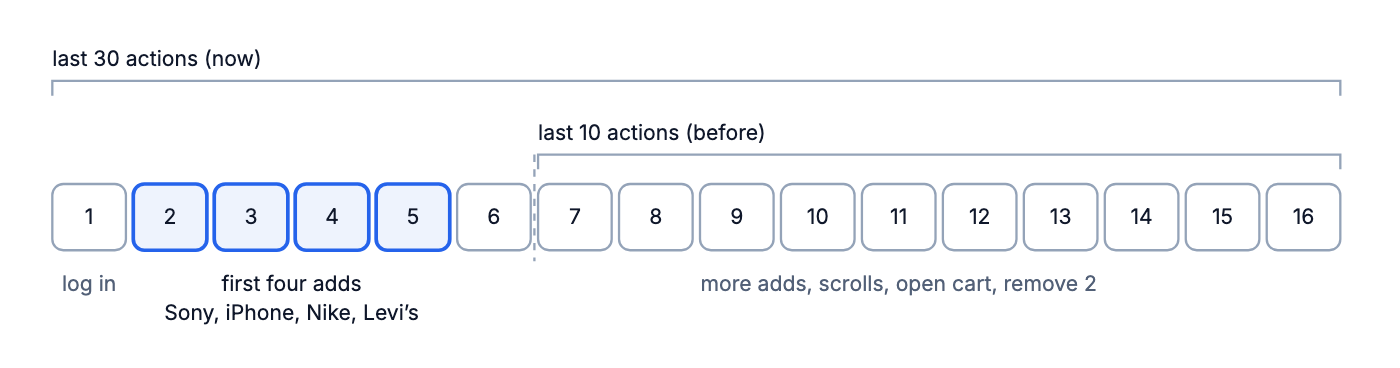
Enough history. The step decision used to see the last 10 actions. Our cart example adds nine products, opens the cart and removes two, and by step 16 all of that was done. But the first adds had dropped out of the window. And the cart opened scrolled to the bottom, so the first products weren't on the screen either.
As far as Jev could tell, nothing had been added. It started over and added everything again until the budget ran out. With the last 30 actions it chose DONE right after the last removal (p=0.95), in 4 runs out of 4.
Earlier pages. A goal like "find the total, then go back" needs something from a page Jev has already left. The run used to go back to look again, forever. Now the state carries a short note for each recent page: its title, its address and the first 220 characters of its text. That goal passed 3 times out of 3, in 3.0 to 4.6 s.
What counts as progress. A click that reloads the same page used to count as a change. On a menu that only opens on hover, Jev clicked "Account" over and over. Now progress means the page's content changed: the address, the title, the text or the controls. Anything else is reported to Jev as "nothing changed". The same run now goes:
CLICK      Account         refused: covered by another element
PRESS_KEY  Escape
CLICK      Account
CLICK      Account         nothing changed
HOVER      Account         the menu opens
CLICK      Order history
DONE                       passed in 3.32 s
Not too early. Clicking "Products" used to return the next page before the product list had loaded. Jev saw no products, went to the cart, came back, and did that until the budget ran out. Now an action waits for the requests it started before Jev sees the page.
Jev as the judge: nobody writes checks
Express has no assertions. Jev decides whether the run did what the goal says, from the evidence the run left behind.
We didn't start there. The first version had a small check language: --expect-request, --forbid-request, checks on spans and logs, and a UI to build them. It worked, and we deleted it. We're doing this with AI. If the user still has to write the checks, what's the point?
Now Jev judges at two moments.
1. When the agent says DONE. DONE is only a claim. We read the page again, plus every API response of the run with its body, and ask Jev two questions in one request:
goal_state: done, not yet, or failed. "Not yet" turns DONE down and the run goes on. "Failed" stops the run right there, because more steps won't fix it.failure_cause: which piece of evidence shows why. Every API response, log line and span in the evidence has an id, like[r3],[l12]or[s5]. The options are those ids, plus "none". Jev reads the text under the id and points at one. Our code never searches for a word.
That's the checkout from the top of this post: the goal failed (p=0.83); the evidence shows GET /api/orders/131 → 200. In our first tests, before "failed" was an answer, this checkout said DONE, got turned down three times and failed after 8.8 s. With it, the run ended at its first DONE, in 6.3 s.
2. After the run, the review. Plain code collects everything that might be a problem: failed requests, 4xx and 5xx responses, console errors, failed or slow spans, and log lines at WARN or above. Similar ones are grouped. This part reads no text. Then one Jev request asks, for each group, if it matters for this goal: none, minor, major or critical. A 401 before login is "none".
The run passes if it ended with DONE, the goal is done, and nothing is major or critical. With IronBee connected, the backend's spans and logs join in. Our checkout's trace covers eight services and about 55 spans, and none of them failed. The failure is in a response body and an INFO log line.
So a run can say "0 problems in 0 anomalies reviewed" and still fail. The plain-code list had nothing to flag; the goal check caught it.
In between we tried a middle way: flag any response whose status, state or result field says "fail" or "error". It caught the e-shop bug. Then on GitHub it flagged CI status responses for other people's commits and turned down DONE three times on a run that was fine. We dropped the rule and let Jev read the bodies. That GitHub goal then passed 3 times out of 3.
Jev gets all of this as text, 24,000 characters at most. Each part has a share, so a long page can't push the API responses out:
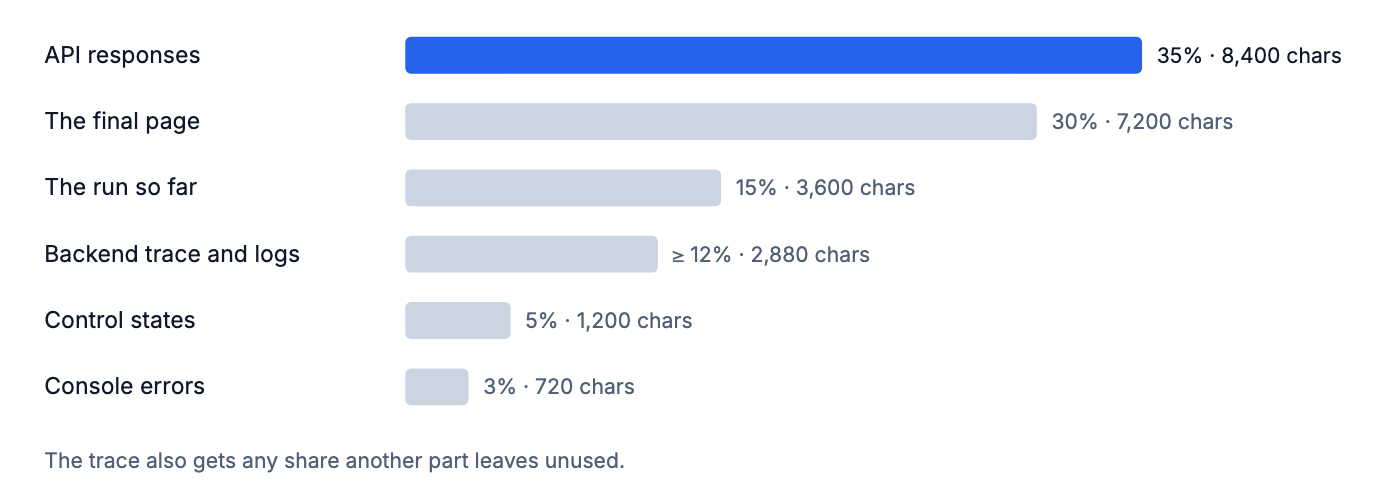
Inside the API share, long bodies are cut so that all of them fit. Short ones stay whole; only the longest are cut, all to the same length:
export function bodyCap(lengths: number[], budget: number): number {
    const sorted = [...lengths].sort((a, b) => a - b);
    let remaining = budget;
    for (let i = 0; i < sorted.length; i++) {
        const share = remaining / (sorted.length - i);
        if (sorted[i] > share) {
            return Math.floor(share);
        }
        remaining -= sorted[i];
    }
    return Infinity;
}
With bodies of 200, 1,000 and 9,000 characters and 6,000 to spend, the first two stay whole and the third is cut to 4,800.
One more thing the page text doesn't show: state. A checked checkbox isn't in the text. On the MUI and Ant Design demo pages the click worked, and DONE was still turned down three times. Now the evidence lists every control with a state: checked, selected, expanded, or holding a value.
It's a model, so it's sometimes wrong. These are the cases we know of:
- Airbnb. Jev set the adults to 2 in the panel but never ran the search again, so the results were still for 1 adult. The judge said done, at p=0.99.
- Google Translate. Two runs out of three passed when they shouldn't have.
- A Kindle order on the demo shop. It passed at p=0.51. Its real state was PAYMENT_FAILED; the judge read the order list before the payment result came in.
The last one has a pattern: a shaky DONE. The obvious fix is to check it again after a short wait, the way we already do for "not yet". We haven't built that yet.
Record once, replay without Jev
A run that passed is saved as a recording. The next run of the same goal replays it with no step decisions at all. The hard part is noticing when the recording no longer fits the site.
Control ids change on every page load, so a recording describes each target the way a person would: its role, its name, the text around it, and its place among twins. Values and secrets are stored by name and filled in from the run that replays it. The recording is keyed by the goal and the start URL.
| Run | Time | Jev step decisions |
|---|---|---|
| Checkout, explored and saved | 6.8 s | 13 |
| The same checkout, replayed | 1.6–1.9 s | 0 |
| Replayed after the site renamed "Cart" to "Basket" | 9.6 s | 9 |
| 20-action example, explored | 11.0–12.1 s | 21 |
| 20-action example, replayed | 3.5–4.8 s | 0 |
A replay notices that its recording is stale in three places:
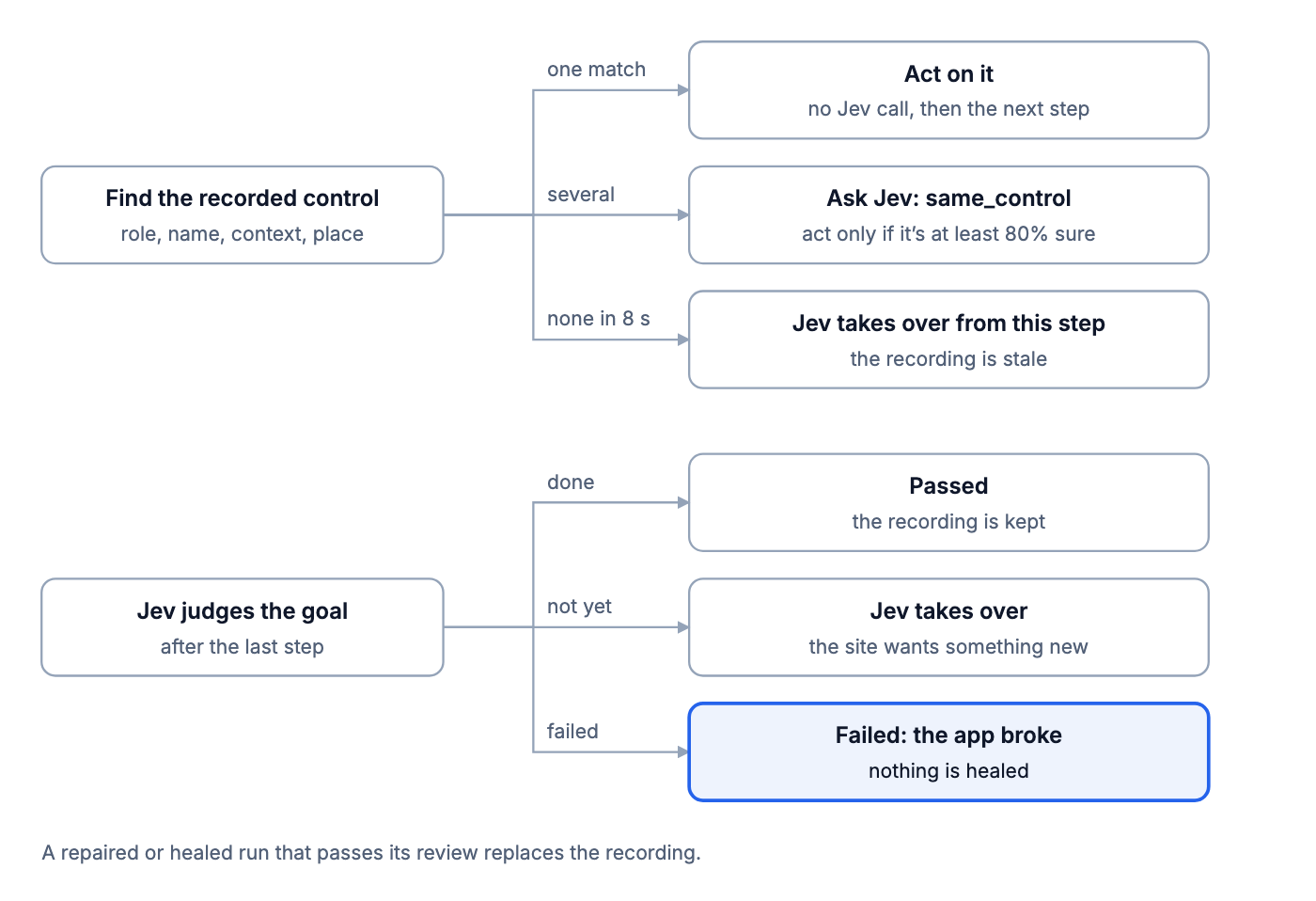
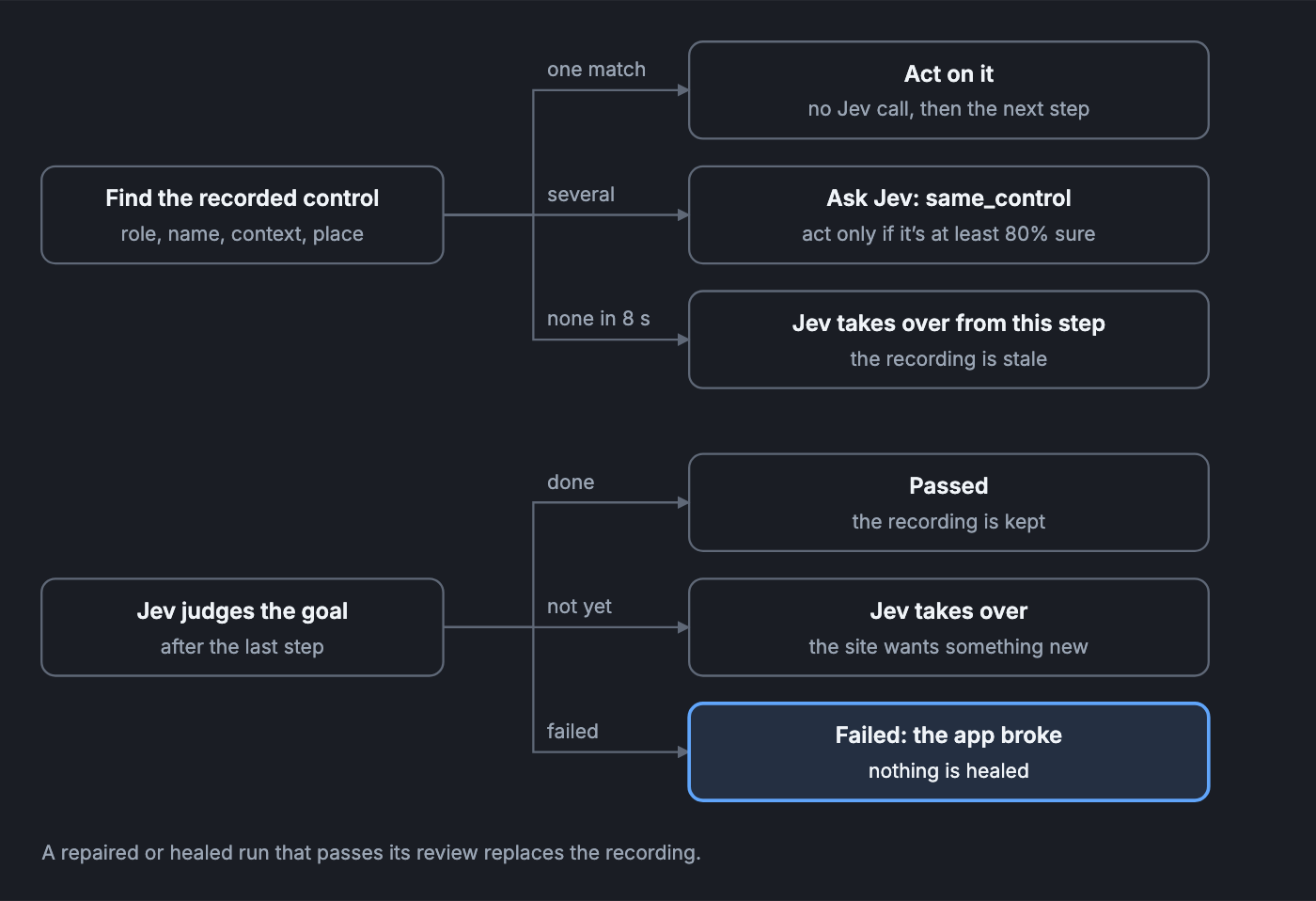
The control isn't there. The replay waits while the page is still changing or a request is still open, up to 8 s. If the control still doesn't show up, the recording is stale. Jev takes over from that step, with the replayed steps as its history. When the site renamed "Cart" to "Basket", the replay noticed in about 2 s and Jev finished the run.
There are several candidates. The text around the control changed, say a new price, or a twin showed up next to it, like a promotion with the same button. We don't guess. We ask Jev one narrow question, same_control: which of these is the recorded control, or none? We act only if Jev is at least 80% sure.
find the recorded control on this page:
  same role, name and context           → use it
  context contains, or is contained in  → use it, if only one control matches
  otherwise                             → the candidates go to Jev as same_control
Why not just ignore the numbers in the context, so a price change doesn't matter? Because a number is sometimes the identity. iPhone 15 Pro and 16 Pro. Order #1042 and #1043.
The goal isn't reached. After the last step Jev judges the goal on fresh evidence, up to three times a second apart while the page settles. "Not yet" means the site wants something new, like a terms checkbox that wasn't there before. The recording is stale and Jev takes over. "Failed" means the app is broken, so the run fails and nothing is healed.
That last split is the one that matters most. A test that heals itself must never heal away a real bug.
When a repaired or healed run passes its review, its recording replaces the old one. The next replay is back to zero decisions.
Does it work? 130 replays
We built a small shop on localhost where we control what changes. Eleven kinds of change, two recorded scenarios, 13 combinations, 10 replays each. That's 130 runs, all against the real Jev.
The first time, 110 of the 130 ended the way they should. The replay called 60 runs stale and 40 of them really were, so 67% precision. It never missed a real one. All the trouble came from three kinds of change:
| What changed | Before | After |
|---|---|---|
| Prices, next to a repeated button | healed for nothing: 4 decisions, 4.5 s | one question (p≈0.94, ~420 ms), 1.9 s |
| APIs 3 s slower | gave up after 1.5 s of no change, then the heal failed: 10 of 10 failed | waited: 10 of 10 passed, 0 decisions |
| A promotion adds a same-named button | clicked the wrong button, then the heal failed: 10 of 10 failed | one question (p=0.97), 1.9 s |
The other eight kinds ended right both times: a renamed button, links moved into a menu, a new required checkbox, CSS only, shuffled products, an error on the page, an error only in an API body, and no change at all.
The interesting part is where it failed. As a judge, Jev was right in every run where it was asked: 90 of 90 before the fixes, 110 of 110 after. It caught the wrong button every time.
As the one taking over, it failed. On the promotion it said DONE again and again. On the slow API it said BLOCKED after a second and a half of "Loading…". So we stopped asking it to improvise:
- The twins got the narrow
same_controlquestion above. - The slow API didn't need Jev at all. The replay now counts the page as still loading while any request is open. A control that's really gone on a site that never stops loading now takes up to 8 s to notice instead of 1.5 s. Slower, but never a wrong call.
After both changes: 130 of 130. Jev is very good at narrow questions. Asking it to improvise was our mistake.
When Jev is stuck, an LLM takes the controls
Jev is a fast driver on roads it knows. When it gets stuck, we hand the controls to an LLM, and only to get unstuck.
Our first version gave the LLM one move. When Jev got stuck, the LLM picked one action and handed back. On BBC Weather that didn't help, because the problem wasn't an action. The selected day is shown only by styling, so nothing in the evidence said Sunday was open, and the judge kept turning DONE down. A smarter click couldn't fix that.
So now the LLM works like an agent of its own:
- It looks at what it wants, as often as it wants. The controls, the page text, a screenshot, the requests, the console, and the read-only DevTools tools: the accessibility tree, the HTML, the trace, React components.
- It acts through the same gate as Jev. One action per call, on a control that was offered, with the same checks and the same recording.
- It ends its turn in one of three ways:
resolvedhands back to Jev,doneends the run on its word,give_upends it. - It has limits. Up to 3 takeovers per run, 15 tool calls each. Its instructions say its job is to get the run unstuck, not to finish the goal.
Each turn is one JSON tool call, {"tool": …, "args": {…}, "why": …}, and the UI shows every look and its reason while it works.
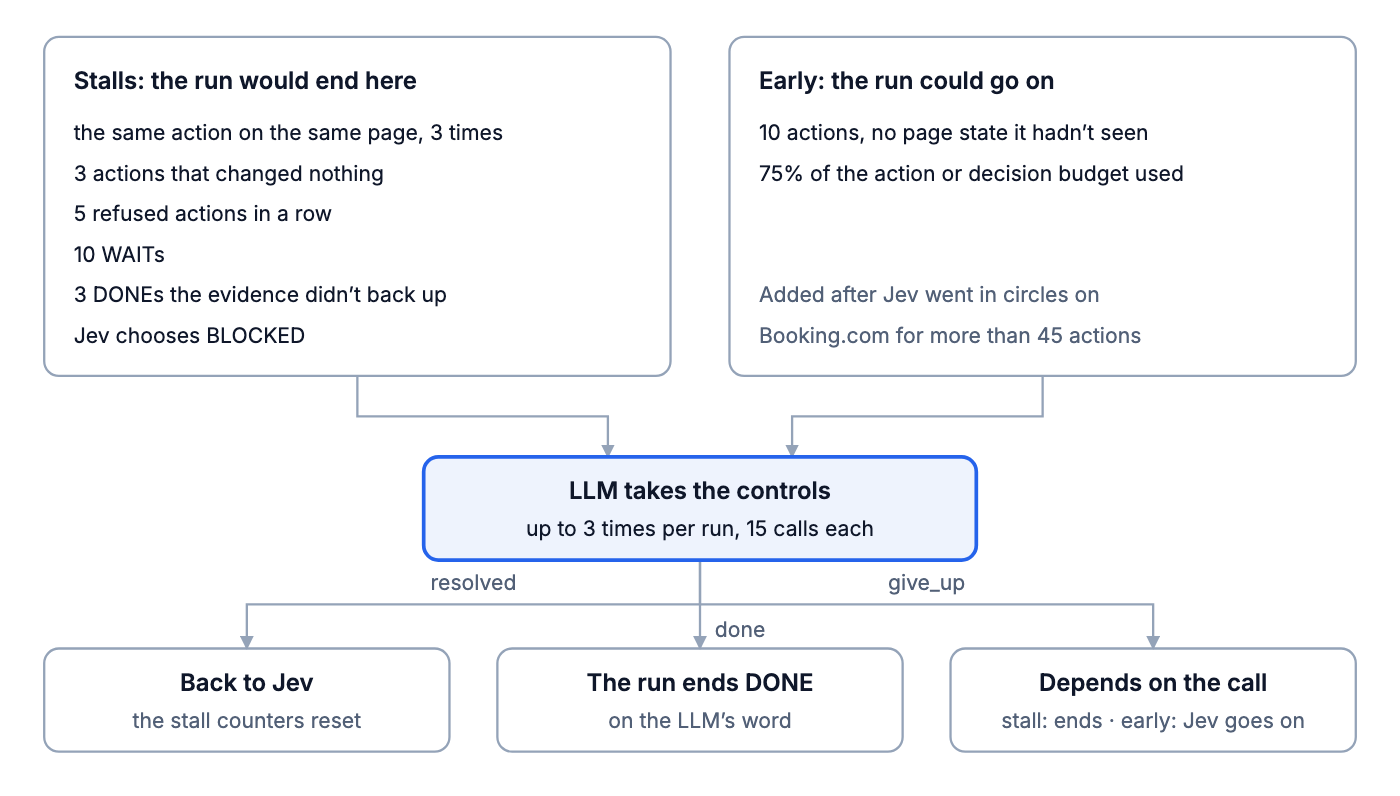
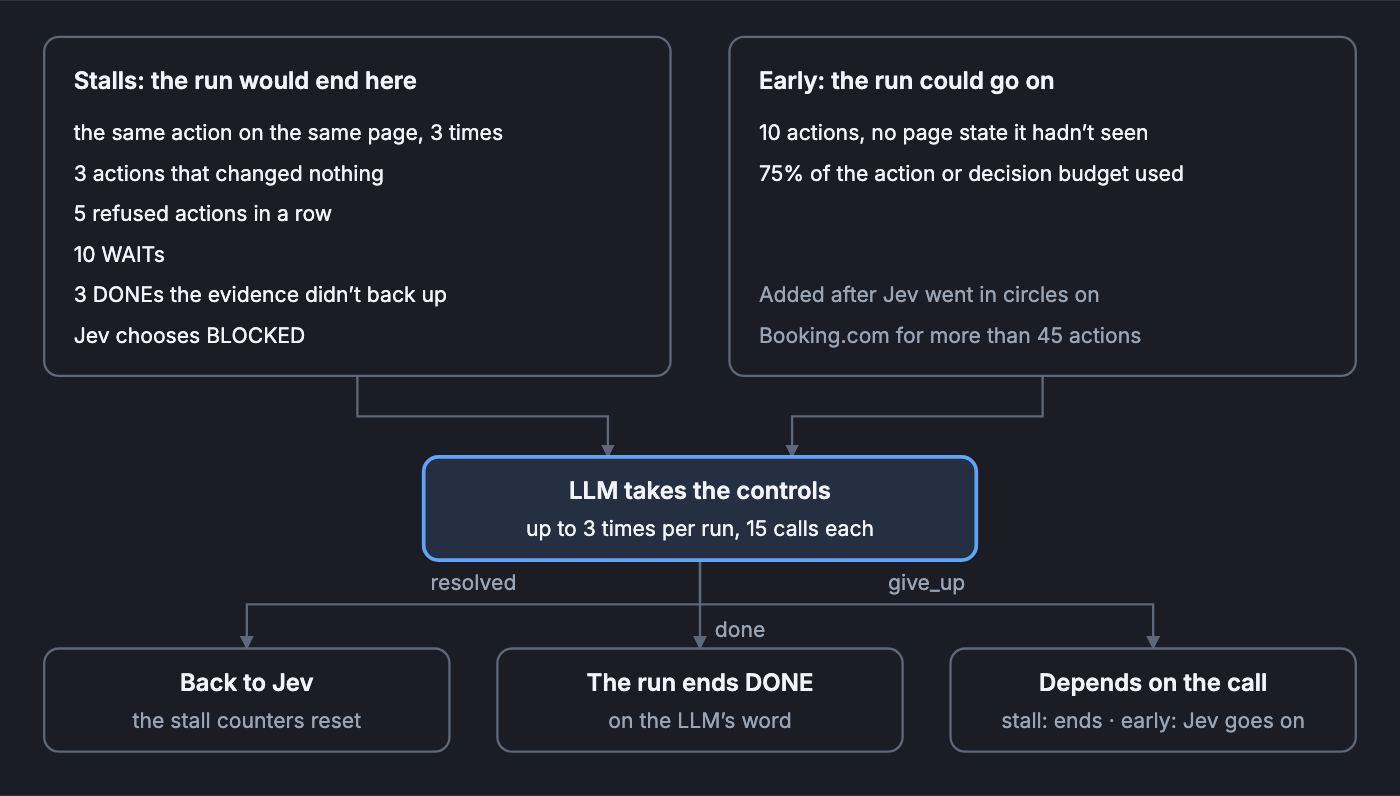
We call it in two kinds of moments. The first is when the run would otherwise end: the same action on the same page three times, three actions that changed nothing, five refused actions in a row, ten WAITs, three DONEs the evidence didn't back up, or Jev choosing BLOCKED.
The second is earlier, while the run could still go on: ten actions without reaching a page we hadn't seen, or 75% of the action or decision budget used. On Booking.com, Jev once went back and forth between search and dates for more than 45 actions. Every step changed the page, so none of the stall checks fired. That's why the second kind exists. If the LLM gives up there, Jev just carries on.
Two runs where it earned its cost:
- BBC Weather. 1 run in 4 needed it. The LLM clicked Sunday, then looked six times: the ARIA snapshot, the HTML twice, a screenshot, the accessibility tree and the page text. Then it called
done, 38 s in. - Google Maps transit. Jev types the departure time but never presses Enter, so the time never applies. And the end state shows only on the screen. Jev alone passed 0 runs of 4. With the LLM stepping in once per run, 4 of 4 passed, in 42 to 63 s.
That's the price: a takeover costs tens of seconds where a Jev step costs 300 ms. We want it to stay rare.
One bug worth sharing. We capped the LLM's reply at 512 tokens, while letting it type up to 2,000 characters. A long reply got cut off in the middle of its JSON, and nothing told the model. It sent the same action again and again until it gave up. The cap is now 4,096 tokens, and we check whether a reply was cut off.
The LLM's other jobs: writing and explaining
Jev never writes. So the LLM, when you add one, does the jobs that need words. Here is the whole split:
| Job | Who | Why |
|---|---|---|
| Pick the next action and its target | Jev | about 300 ms, and only what was offered |
| Pick the value for a field | Jev | from your values, your secrets by name, and text quoted in the goal |
| Judge the goal and every anomaly | Jev | one request, pointing at evidence ids |
| Write a value nobody gave us | LLM, optional | Jev can't write |
| Get a stuck run moving | LLM, optional | free to look around, acts through the same gate |
| Explain a failed run in words | LLM, optional | after the verdict, and it never changes it |
Writing. For each field, Jev first chooses among what it has. Only if nothing fits does it pick GENERATE, and then the LLM writes the value. If the LLM says there's nothing to write, {"text": null}, we type nothing. With a person watching, the run pauses and asks them. Without one, the step is refused and Jev moves on.
Before we used hosted LLMs, we tried small models inside the process, under 100 MB, so no network call was needed:
| Model | Size | Time per field | What happened |
|---|---|---|---|
| distilbert-base-cased-distilled-squad | ~63 MB | 5–8 ms | could only copy text that was already in the goal |
| LaMini-Flan-T5-77M | ~94 MB | 33–57 ms | wrote field names back, mixed fields up |
| flan-t5-small | ~94 MB | 12–48 ms | the same |
We also tried plain rules that cut values out of the goal. They worked in English, for that one checkout. We deleted all of it. Quoting values in the goal does the same job for free.
A hosted model isn't free either. An API call is about 1 s. The Claude Code CLI, which runs on your own login, is about 6 s, and Codex about 8 s, because each call starts a whole agent. One checkout that wrote two fields through the CLI took 17.0 s, and 12 of those seconds were the two LLM calls.
That's why value descriptions exist: if Jev can pick the value, the LLM is never called. And when a step is retried, we reuse the text the LLM already wrote instead of paying for it twice. In one run that saved about 8 s.
Explaining. When a run fails, the verdict is Jev's. Then the LLM gets the evidence, the verdict and the piece of evidence Jev pointed at, and writes one to three sentences. For the payment bug, Claude Sonnet through the CLI took 5 s to say, roughly: the order was created, the inventory service rejected it, the order service marked it FAILED, and the page still said it was placed. The UI shows the verdict first and the explanation under it, and the explanation never changes the verdict.
How to try it
It's on GitHub at ironbee-ai/ironbee-express, under the Elastic License 2.0. You need Node.js 22, Chrome and a TypeSafe API key:
git clone https://github.com/ironbee-ai/ironbee-express.git
cd ironbee-express
npm install && npm run build
echo 'TYPESAFE_API_KEY=…' > .env
npm run dev -- ui
Load an example from the list and press Run. The e-shop examples sign in to our demo shop with the password demo123. If you'd rather run it on the IronBee platform, the waitlist is open.