Your AI QA Engineer Now Runs on Every Netlify Deploy
IronBee opens the deploy Netlify just built, uses your application on it, and checks that the code you changed actually ran. Automatic, on every pull request, before anything reaches production.

Today we are shipping IronBee for Netlify.
Every deploy Netlify builds is a live copy of your change, running with your configuration and your environment. IronBee opens it, uses your application the way a person would, and reports back on the pull request before anyone merges.
And it does not take its own word for it. While it is using the deploy, it traces what actually executes inside the running application, then checks your changeset against that trace. If part of your change never ran, it says so instead of passing.
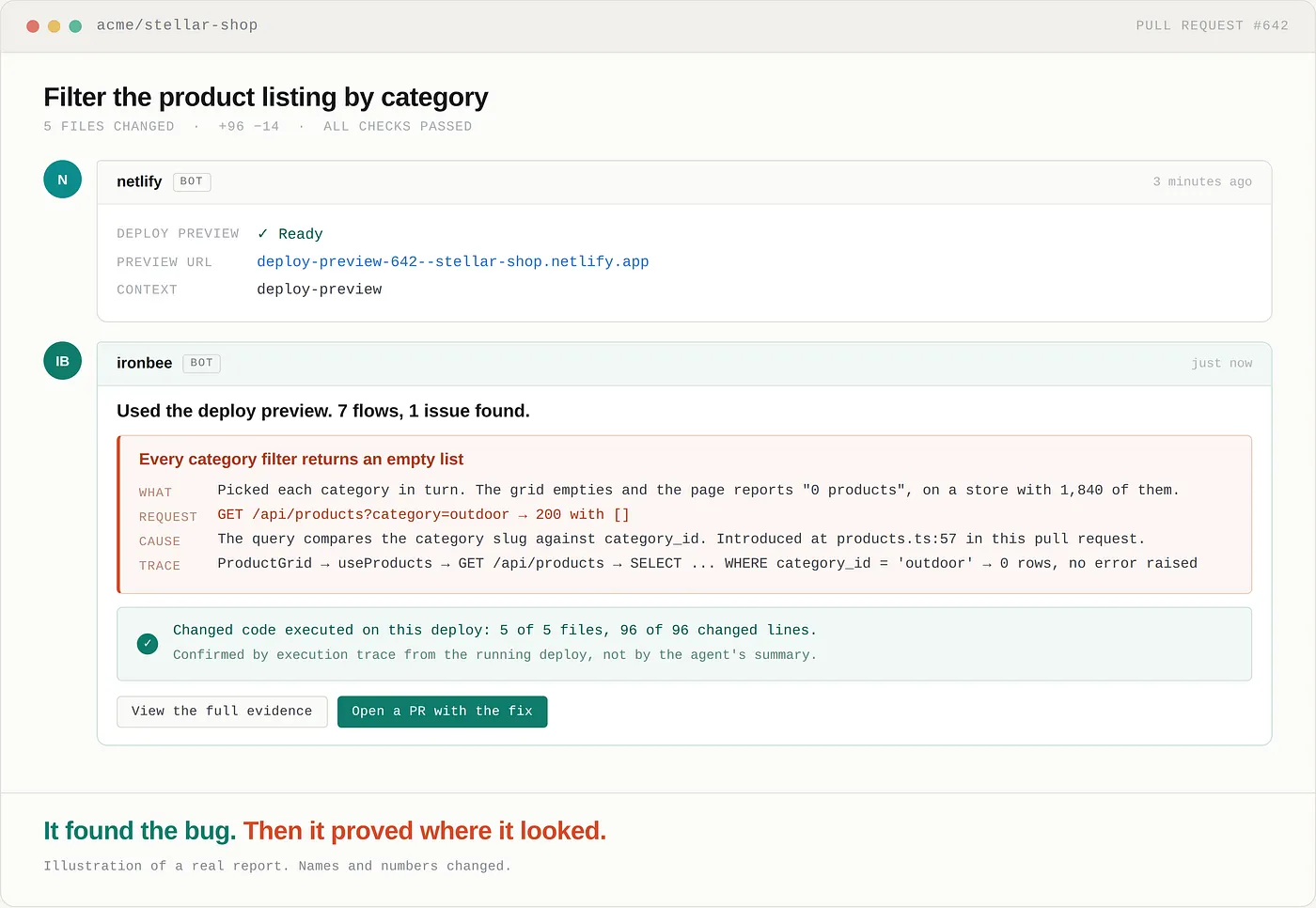
What is new
A Netlify Extension. Install it on your team, then enable the sites you want covered. Nothing else to set up.
Per site deploy contexts. Choose which deploys get tested: deploy previews, branch deploys, production, or any combination. A static marketing site and a customer facing app do not need the same answer.
Protected sites work. If your deploys sit behind Netlify’s password gate or a Basic Auth rule in _headers, IronBee gets through and tests them like any other deploy.
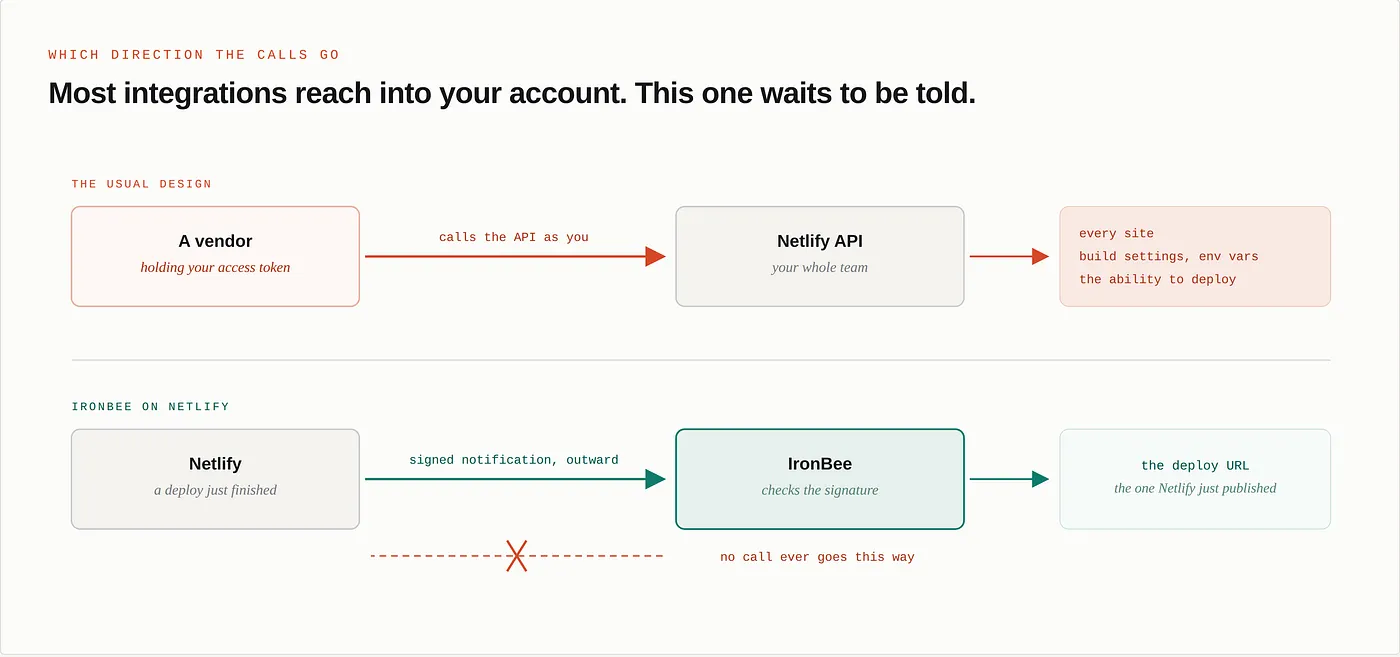
No access token. IronBee never calls Netlify’s API on your behalf, and holds nothing that could. More on that below, because it is the part people ask about.
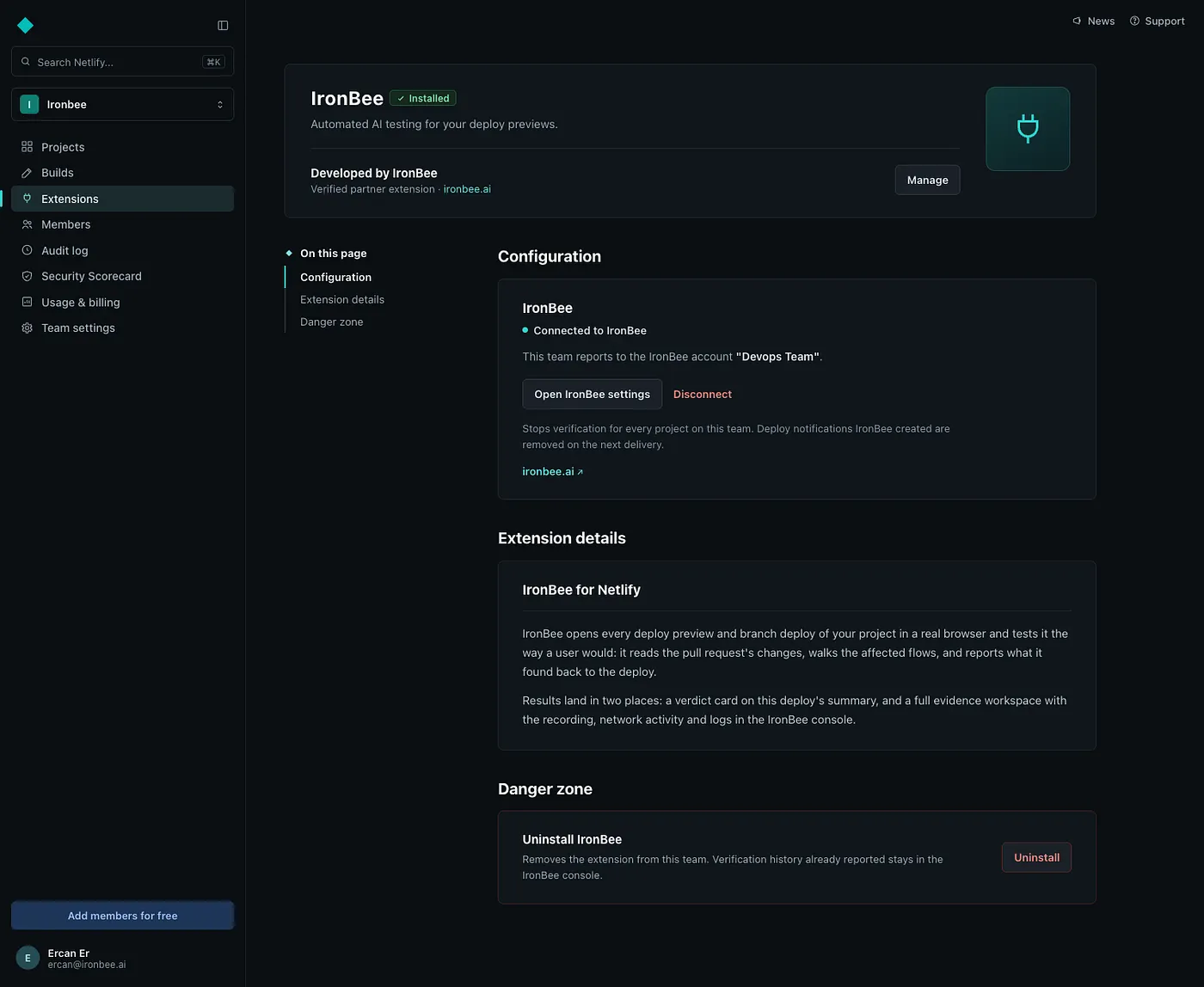
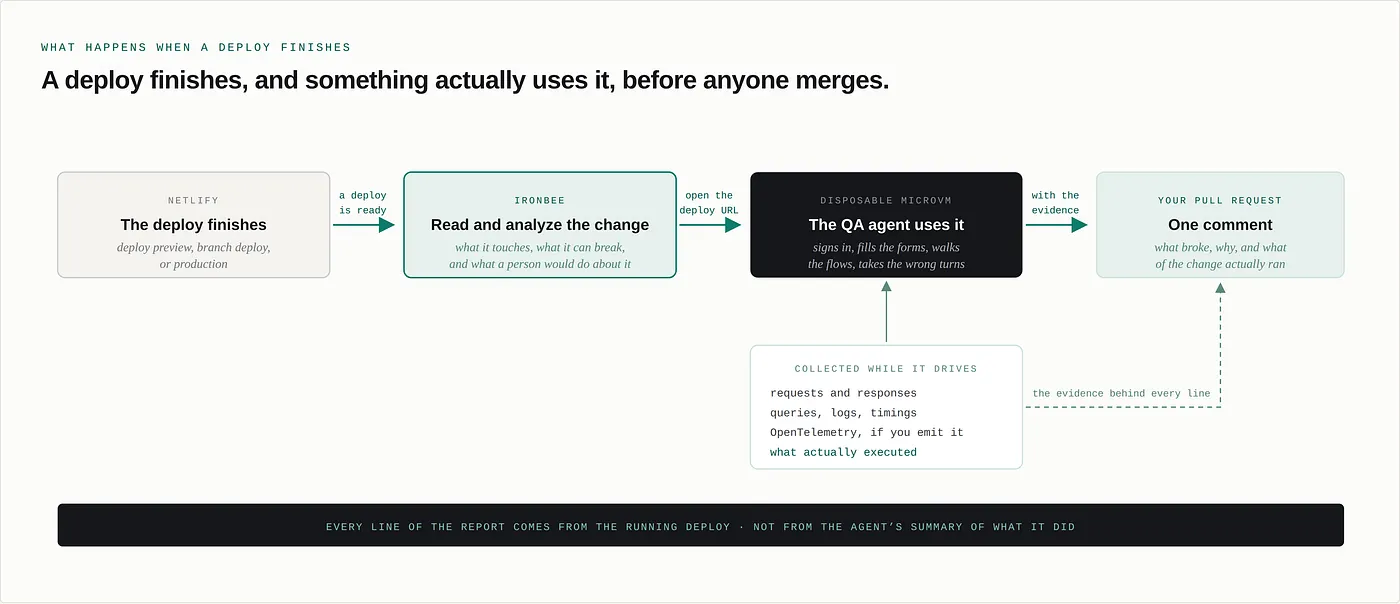
What happens on a deploy
A deploy finishes. IronBee picks it up and reads the change that produced it, then analyzes it: what it touches, what it can plausibly break, and what a person would do about it.
Then it goes and does exactly that on the live deploy. It signs in. It fills the forms. It clicks the thing you did not expect anyone to click. It walks the flow the way somebody who has never seen your product would walk it.
There is no script to write. There is no selector to maintain. Nothing breaks the next time a button moves, because nothing was recorded in the first place.
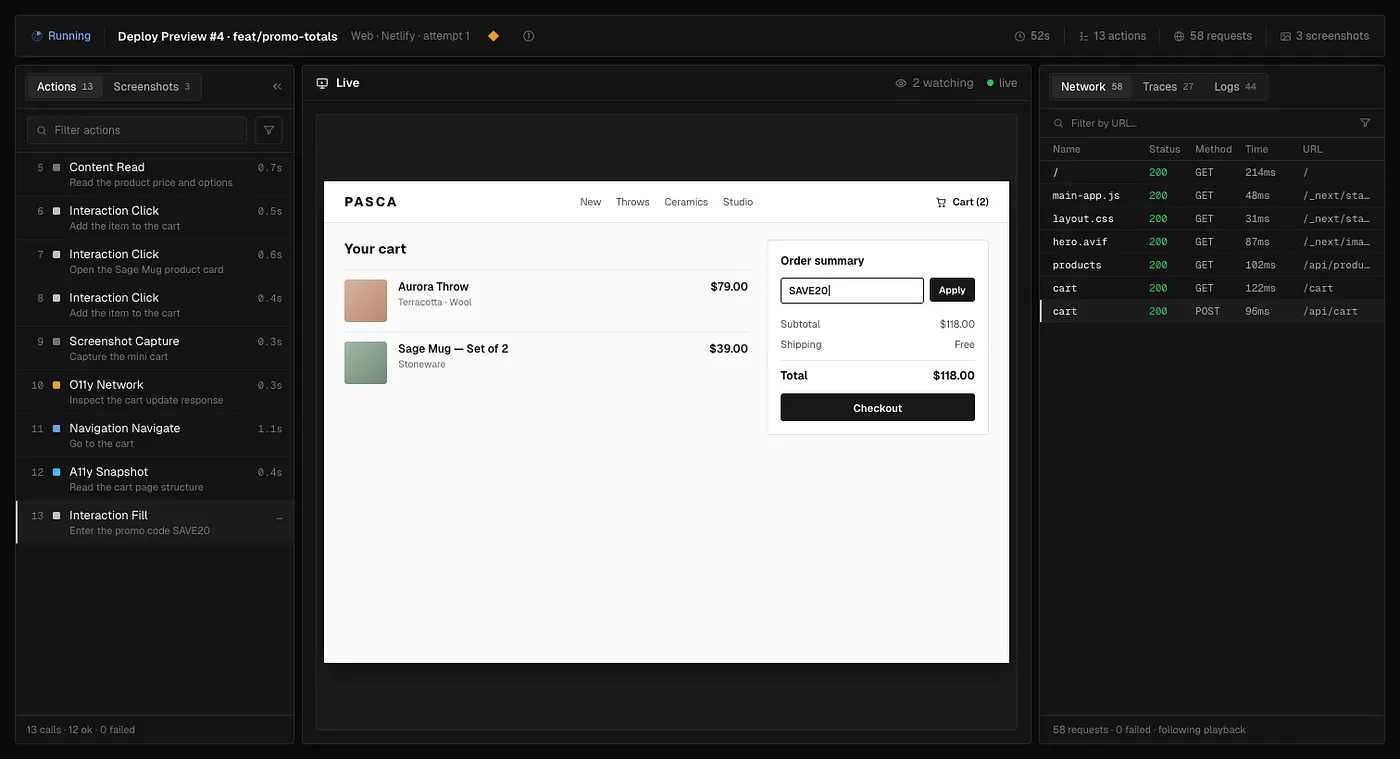
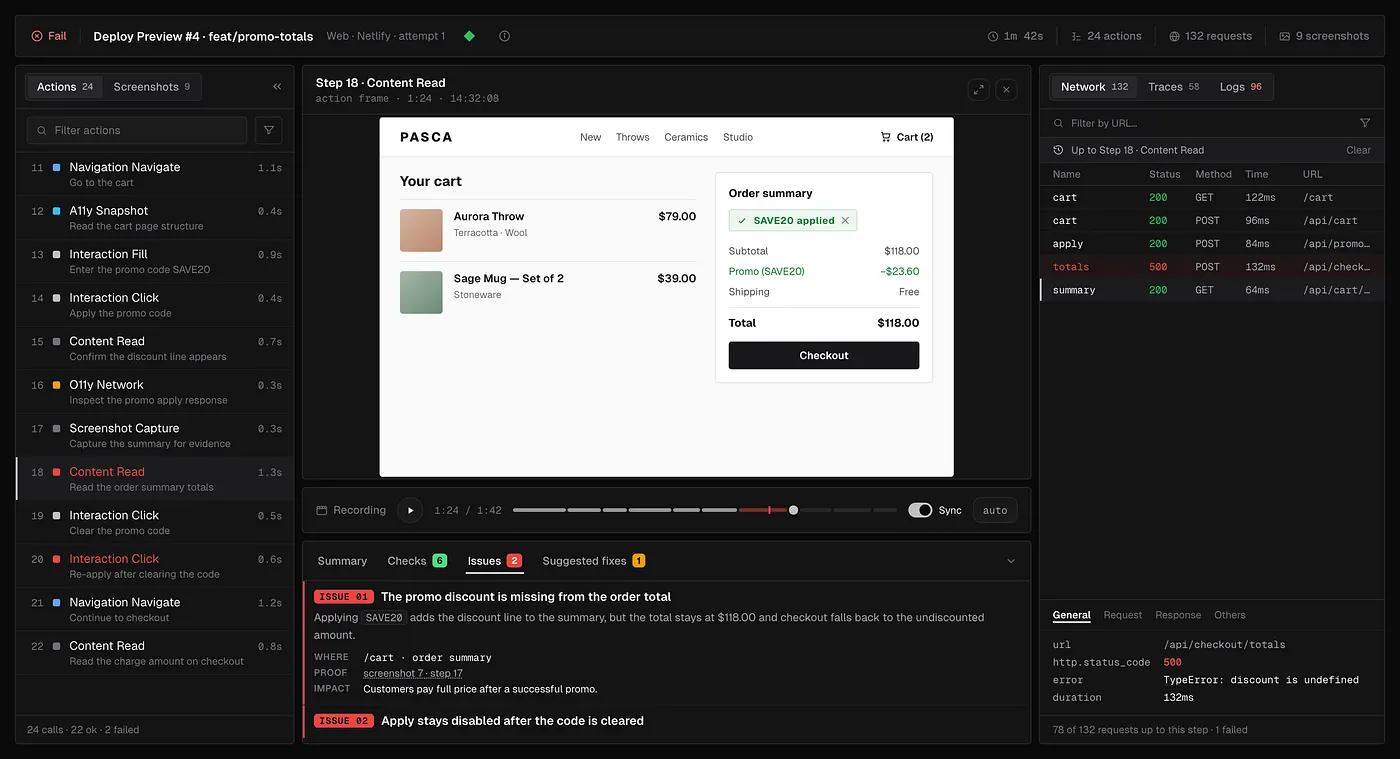
You can watch it while it happens. The run streams as it goes: what it has done so far, the screen it is looking at right now, and every request the deploy is making underneath.
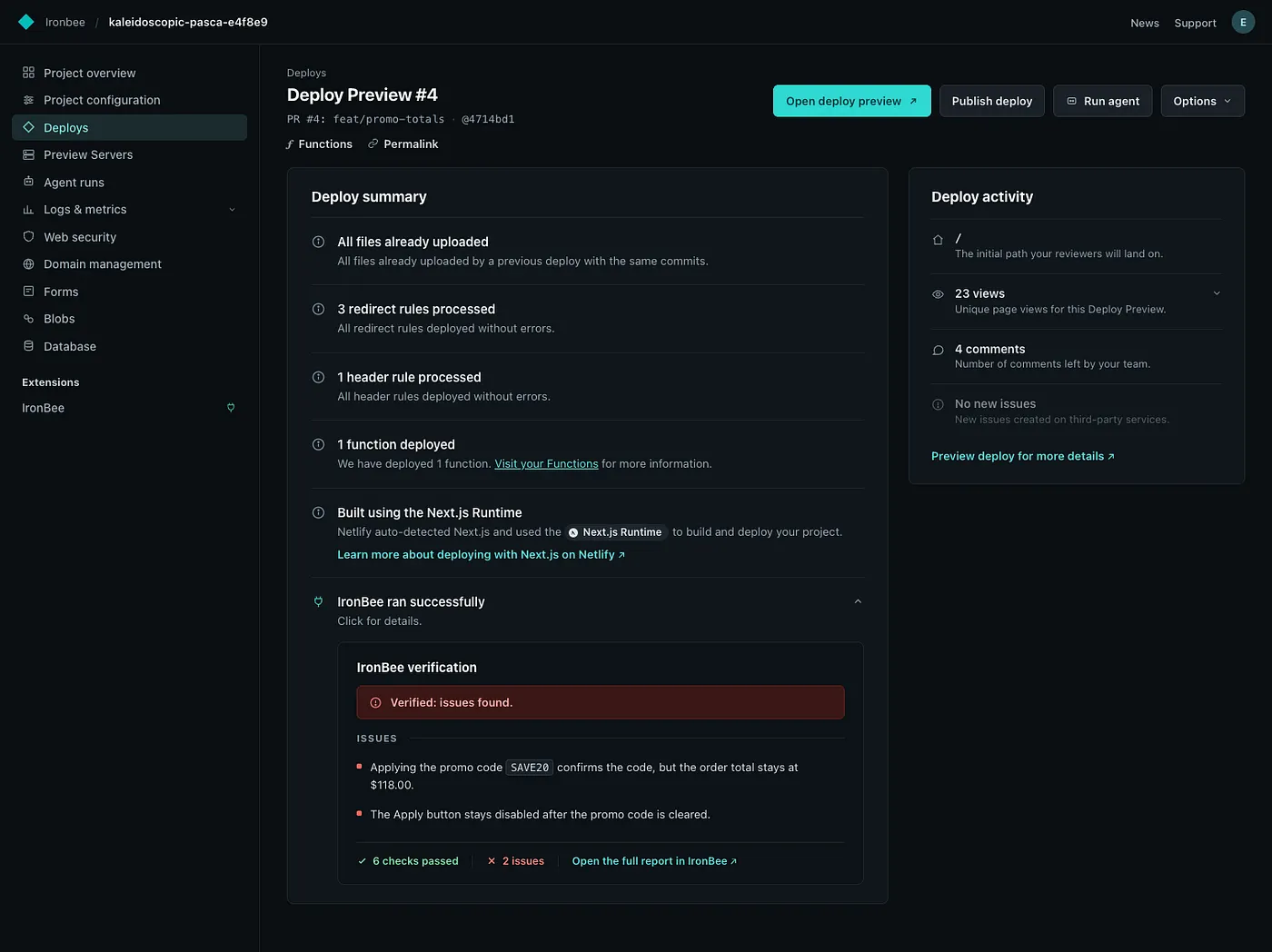
Then it reports, and the verdict goes back to where the deploy already lives. On Netlify it lands on the deploy summary itself, next to the build output, so whoever opens that deploy sees it without going anywhere else. If your repository is connected through the GitHub App, the same report comes back as a comment on the pull request, usually before a reviewer has finished reading the diff. The whole run, with the recording, the network activity and the logs, stays in the IronBee console.
Which deploys get tested
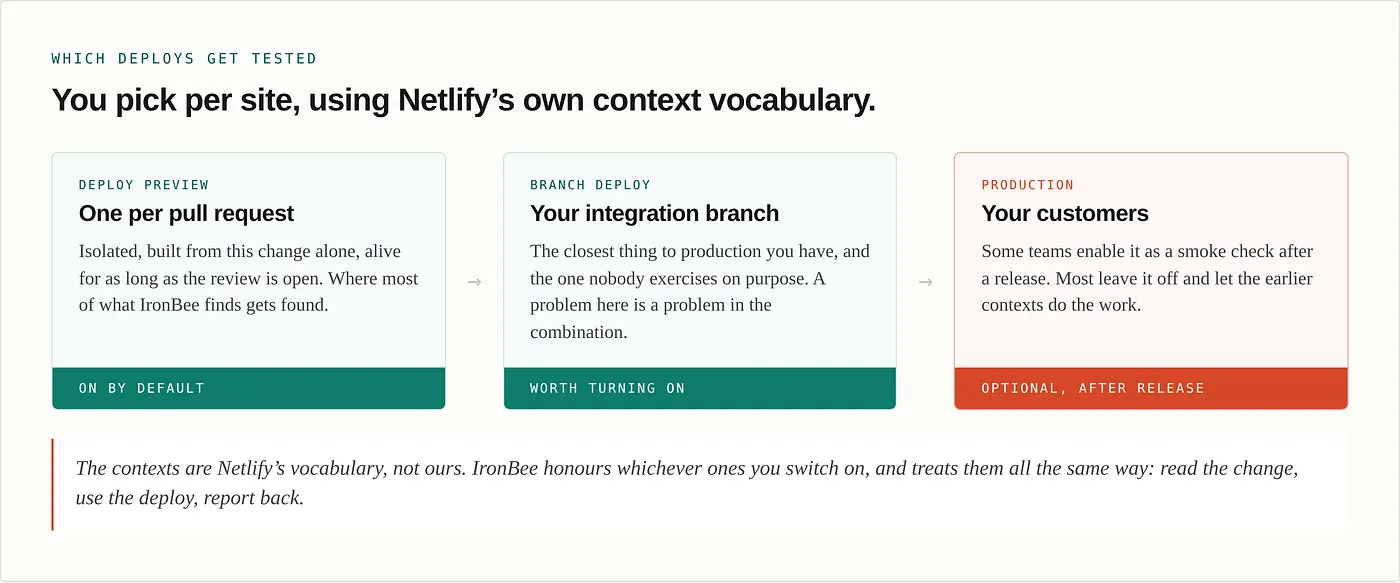
You choose per site, using Netlify’s own contexts.
Deploy previews are the default. One per pull request, isolated, alive for as long as the review is open, and where most of what IronBee finds gets found.
Branch deploys are worth turning on too. That long lived branch everyone merges into is the closest thing to production you have, and it is almost never exercised on purpose. A problem found there is a problem in the combination rather than in one pull request.
And production, if you want it, usually as a smoke check after release rather than a gate before it.
It does not stop at “it failed”
Plenty of tools can tell you that a flow broke on a preview. You get a red X, a screenshot of a spinner, and a suggestion to retry. Which leaves the actual work where it was. Somebody still has to reproduce it, find the cause, and decide what to change.
IronBee collects the evidence while it is using the deploy, not afterwards.
If your application emits OpenTelemetry, we read it. If you install our SDK, we get more: runtime introspection while the agent is driving, so we can see what the code was doing at the moment the screen went wrong. Requests, traces, queries, logs, timings and state, all lined up against the exact action that produced them.
So what comes back is not “the product listing is broken”. It is the request that failed, the query that returned nothing, the exception that got caught and logged at info level so nothing alerted, and the line in this pull request that caused it.
And when the fix is clear, IronBee will write it and open a pull request.
It proves the change was actually exercised
This is the part I would want to hear about if I were reading somebody else’s announcement, so let me be direct about it.
You point an agent at a deploy and tell it to verify the change. It goes off, clicks around, and comes back saying everything looks good.
How do you know it went anywhere near your change?
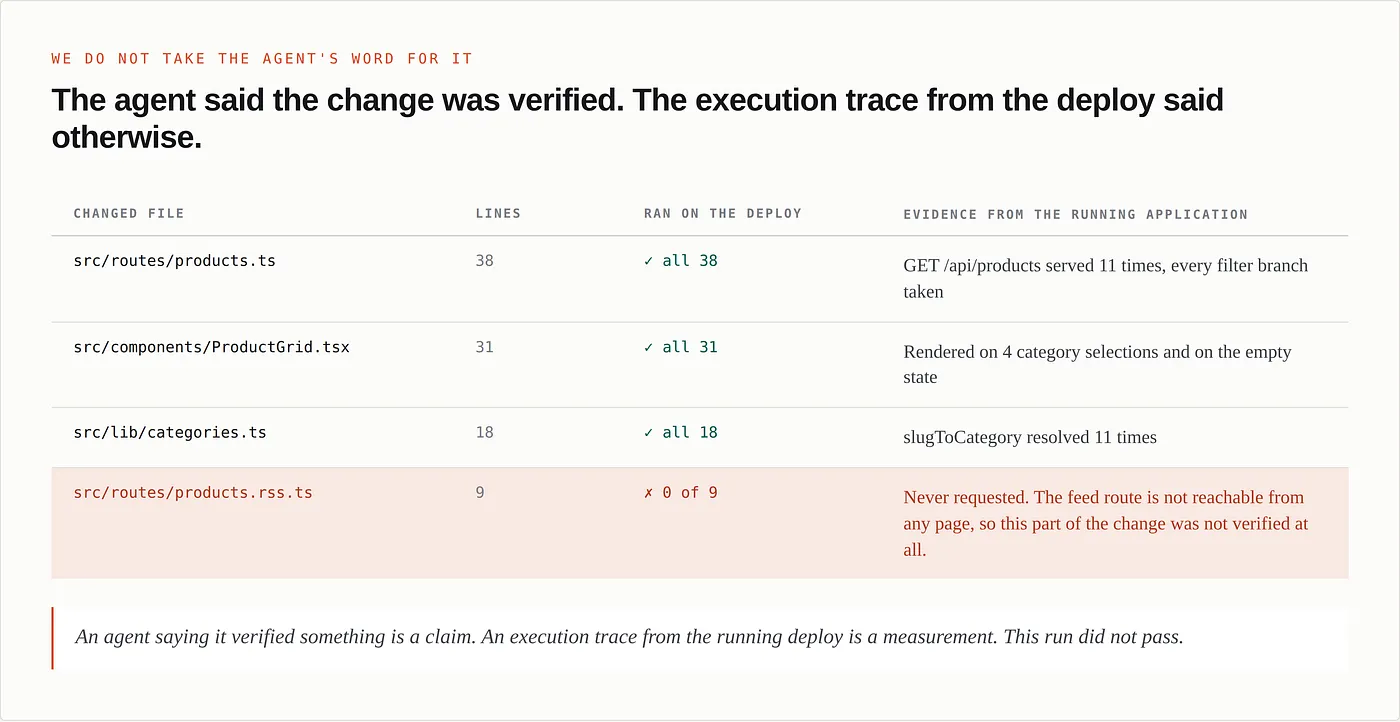
You do not. Not from the answer. An agent that got confused, or could not reach a flow, or quietly decided a path was too hard to get to will produce the same confident summary as one that did the work. And because the summary is specific and well written, it reads like evidence. It is not evidence. It is a claim.
So IronBee does not take it. While the agent is using the deploy, we trace what actually executes inside the running application. Then we take the changeset from the pull request and check it mechanically. Did this function run. Did this branch get taken. Did this handler get called on the live deploy.
If part of your change never executed, we do not pass it. We tell you which part was not reached, and why the run never got there.
An agent saying it verified something is a claim. An execution trace from the running deploy is a measurement.
Treating those as the same kind of green is how a team ends up trusting a QA agent that has quietly stopped doing its job.
We never hold a token for your Netlify account
Most integrations work by holding an access token with rights over your account. It is the normal design, we use it ourselves elsewhere, and it is worth being honest about what it means: something in a vendor’s database can read your sites, see your settings, and act as you, until somebody remembers to revoke it.
The Netlify integration does not work that way.
IronBee never calls Netlify’s API on your behalf. Netlify tells us when a deploy is ready, and that notification is signed. We verify the signature and then go and look at the deploy, at the URL Netlify just published. That is the entire relationship.
What we hold per enabled site is a signature secret, and its only purpose is to confirm that a deploy notification really came from Netlify and really belongs to that site. It cannot read anything. It cannot change anything. It cannot trigger a deploy. It is bound to one site and one account, so it cannot be moved to another.
And when there is nothing deployed
Not everything you ship gets a URL. Backend services, workers, packages inside a monorepo, anything where the build produces an artifact instead of a deployment.
IronBee runs inside your CI job for those, connecting into the runner through a secure tunnel and using the application running right there. Nothing has to be deployed anywhere. Same agent, same report, same coverage check.
Getting started
Start in the IronBee console, under Integrations, and pick Netlify.
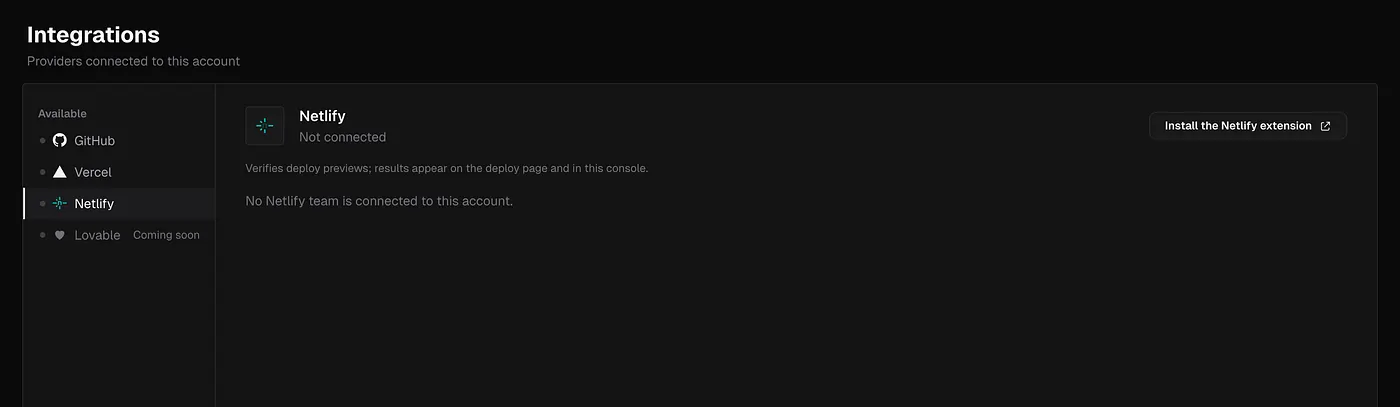
From there it is three short steps, and all of them happen on Netlify’s side: install the extension, pick your team, turn on the sites you want covered. The console watches for the installation and moves you forward by itself. There is no key to copy and nothing to paste back.
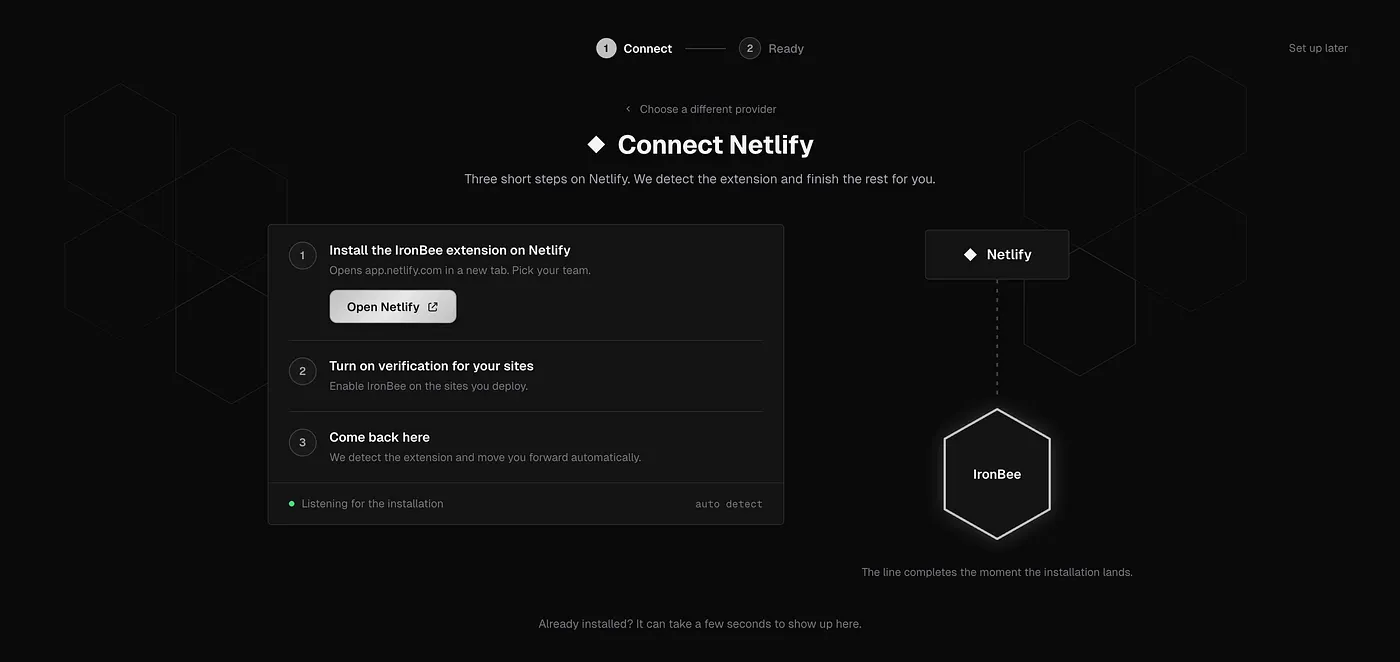
Then choose the deploy contexts per site, and connect your GitHub repository if you want the report on the pull request as well.
After that, open a pull request. The deploy preview builds, IronBee uses it, and you get back what it tried, what broke, the root cause with the evidence behind it, and which parts of your change actually ran on the live deploy. If nothing broke and the whole change was covered, you get a short green verdict and you get on with your day.
Nobody has to write a test, maintain a selector, or remember to open the preview link.
Why now
Coding agents already write more code than anyone can carefully review. The bottleneck moved from writing code to knowing whether the code works, and the answer to that question still mostly arrives from a customer.
Netlify already builds the thing that answers it. Every change gets a live deployment, with your configuration and your environment, automatically. The gap was never the environment. The gap was that using it was somebody’s job, and nobody had time.
Now it is somebody’s job again. Your AI QA engineer, on every deploy, with the evidence to show it actually looked.
TRY IT ON YOUR NEXT PULL REQUEST
IronBee is public. The Netlify extension is live, alongside the GitHub App and the CI path. If you try it on a real deploy and it misses something, I would rather hear about that than the compliment.
See how it works → ironbee.ai
Start using it → console.ironbee.ai
Netlify extension → app.netlify.com/extensions/y-0ak6dz-ironbee