Introducing IronBee: The Verification and Intelligence Layer for AI Coding Agents
AI coding agents are fast. They generate features, fix bugs, refactor code, often in minutes. But there’s a problem nobody talks about: they almost never verify their own work.


AI coding agents are fast. They generate features, fix bugs, refactor code, often in minutes. But there’s a problem nobody talks about: they almost never verify their own work.
An agent can confidently tell you “I’ve implemented the checkout flow” while the submit button doesn’t fire, the price calculation is wrong, and there are three JavaScript errors in the console. It doesn’t know. It never looked.
Today we’re open-sourcing IronBee CLI, the first piece of a larger platform we’re building to solve this problem.
IronBee CLI is the verification layer: it mechanically enforces that AI agents test their code changes in a real browser before completing any task. But verification is just the beginning.
We’re building the IronBee Platform with three core capabilities:
- Verification Layer provides full observability into every verification and fix cycle. See exactly what the agent tested, what failed, and how it was resolved.
- Observability Layer automatically instruments your application with OpenTelemetry during verification. Every trace, span, and metric is correlated with the coding session and verification cycle that triggered it. When an agent’s code change causes a slow API call or a failed database query, you see it in context, not as an isolated trace in a separate dashboard.
- Intelligence Layer analyzes the coding, verification, and fixing phases of every session. It surfaces patterns, identifies bottlenecks, and delivers recommendations to optimize both time and cost.
The result: agents that autonomously verify their own code, full-stack observability tied to every change, and intelligence that helps optimize the entire cycle. Fewer bugs, shorter cycles, lower costs.
The IronBee Platform launches mid-May. We’re now accepting early access signups at ironbee.ai.
What Is IronBee CLI?
IronBee CLI is the open-source verification layer for agentic development. It sits between your AI agent (Claude Code, Cursor) and task completion, enforcing a simple rule:
You wrote code? Prove it works. In the browser. Right now.
When IronBee is active, the agent cannot finish a task until it:
- Opens the application in a real browser
- Navigates to the affected pages
- Functionally tests the changes: clicks buttons, fills forms, submits data
- Checks for console errors and accessibility issues
- Submits a structured verdict (pass or fail)
If verification fails, the agent must fix the issues and re-verify. No shortcuts, no “it should work.”
The Problem: Trust Without Evidence
Here’s what a typical AI agent session looks like without verification:
Agent: I’ve updated the checkout page with the new discount logic. The promo code field now validates against the API and applies the discount to the order total.
Reality: The discount shows correctly in the cart but disappears on the order confirmation page. The promo input has white text on a white background. The form submits even when empty.
The agent read the code, understood the intent, and reported success. But it never actually saw the result. It never clicked the button. It never noticed the invisible text.
This is the gap IronBee fills: mechanical enforcement that turns “I think it works” into “I verified it works, here’s the evidence.”
How It Works
Setup: Two Commands
IronBee works in two ways:
- Automatic: hooks intercept the agent at key moments. When the agent edits code, IronBee clears any previous verdict. When the agent tries to complete a task, the Stop hook blocks it until verification passes. The agent is forced into the verify-and-fix loop without any manual intervention.
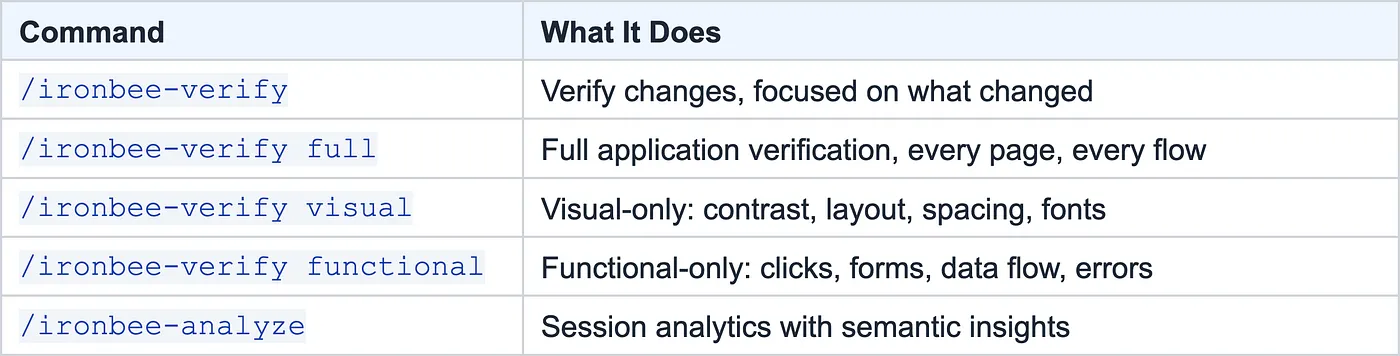
- On-demand: the /ironbee-verify command lets you trigger verification explicitly with different scopes (default, full, visual, functional).
npm install -g @ironbee-ai/cli
cd your-project
ironbee install
That’s it. IronBee auto-detects your AI client (Claude Code or Cursor) and configures hook integration, browser-devtools MCP server, and verification rules and skills.
The Verification Loop
Once installed, every coding session follows this pattern:

The agent doesn’t just take a screenshot and call it done. It must interact: navigate pages, click buttons, fill forms, verify data flow, check the console. IronBee’s Stop hook validates that all required browser tools were used before allowing completion.
This loop is not voluntary. IronBee hooks into the agent’s lifecycle: every file edit clears the verdict, every browser tool call is tracked, and the Stop hook mechanically blocks task completion until a valid passing verdict exists. The agent cannot skip verification, even if it wants to.
What the Agent Actually Does
When the agent runs verification, it goes through a real testing flow:
- Starts the dev server: builds the app, finds the correct port
- Navigates to each affected page: takes a full-page screenshot and ARIA snapshot
- Visually analyzes every screenshot: checks readability, layout, spacing, colors, images
- Functionally tests: clicks buttons, fills forms, submits data, verifies results
- Checks console: catches JavaScript errors and failed network requests
- Submits a structured verdict with specific observations:
{
    "status": "fail",
    "pages_tested": ["http://localhost:3000/checkout"],
    "checks": [
        "discount applies in cart: $391.50 off",
        "checkout form renders with address and card fields",
        "empty form submission shows no validation error",
        "order total on confirmation shows $2348.99 instead of discounted $1957.49"
    ],
    "console_errors": 0,
    "network_failures": 0,
    "issues": [
        "no form validation on empty submission",
        "discount not applied to order confirmation total"
    ]
}
No generic “it works.” Specific checks, specific issues.
Beyond Verification: Intelligence
Verification is the enforcement layer. But the real power is in what IronBee learns from every session.
Session Analytics
Here’s what ironbee analyze looks like on a real project with 19 sessions:
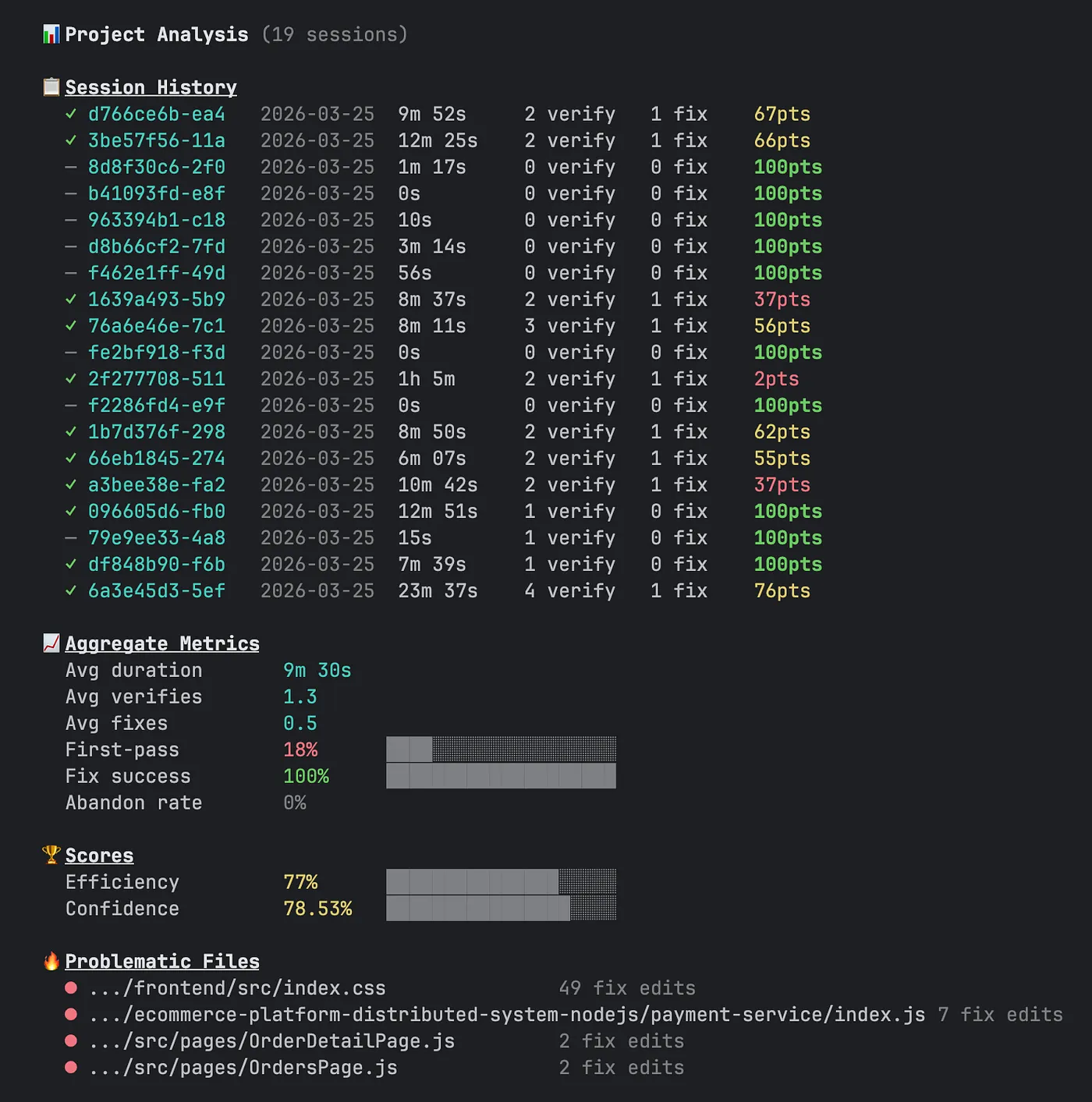
Every verification cycle generates structured data: timestamps, file edits, tool calls, verdicts with checks and issues. IronBee analyzes this across three dimensions:
Time: Where does the agent spend its time?
Each session breaks into three phases: coding, verification, and fixing. A healthy session is mostly coding with quick verifications.

Quality: How thorough is the verification?
IronBee tracks pages tested, checks performed, console errors, and pass rates. An agent that tests one page with zero checks is very different from one that tests five pages with detailed observations.
Code: Which files cause the most problems?
Hot files (most frequently edited), problematic files (most edits during fix cycles), and edit churn (files touched in multiple fix cycles, a sign the agent is treating symptoms, not root causes).
Three Scores
IronBee distills everything into three scores:
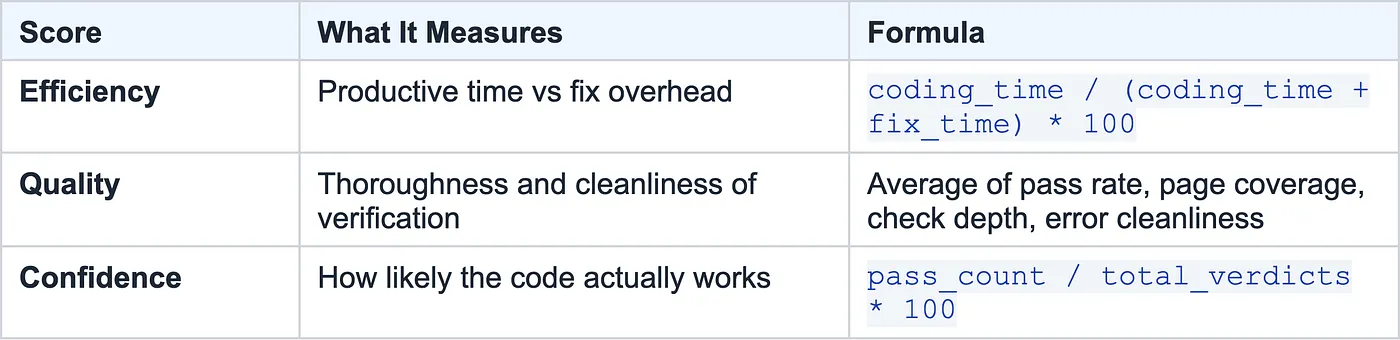
A session with 95 efficiency, 88 quality, and 100 confidence tells a very different story than one with 40 efficiency, 60 quality, and 50 confidence.
Semantic Analysis
Raw metrics tell you what happened. Semantic analysis tells you why.
The /ironbee-analyze command feeds session data, including the actual text of checks, issues, and fixes from every verdict, to the LLM for interpretation:
- Issue patterns: Are the same types of bugs recurring? (layout issues, API errors, state management)
- Fix effectiveness: When the agent fixes something, does it stay fixed?
- Problematic areas: Which parts of the codebase consistently cause verification failures?
- Improvement trends: Is the agent getting better over time?
This turns raw verification data into actionable insights about your codebase and your agent’s capabilities.
Real-World Use Cases
Catching What Code Review Can’t
An agent implements a new glassmorphism theme for the checkout page. The code looks correct: CSS variables, backdrop filters, proper class names. A code review would approve it.
But IronBee forces the agent to actually open the page. The screenshot reveals order summary text at 4% opacity on a dark background. Technically present in the DOM, completely invisible to users.
Without browser verification, this ships. With IronBee, it’s caught and fixed before the task completes.
Microservices and Distributed Systems
An agent updates the payment service to remove an even-order-only guard and adds a reconciliation check. The code change is clean. Unit tests pass.
IronBee forces end-to-end verification: place an order through the UI, check the order status. The verdict reveals a failed payment status and a price mismatch between cart and confirmation. The backend change broke the integration, something only a real browser flow would catch.
Tracking Agent Performance Over Time
After 50 sessions with IronBee, project-level analytics reveal:
- First-pass rate improved from 40% to 75% over two weeks
- src/components/CheckoutForm.tsx appears in fix cycles across 12 sessions (needs refactoring)
- Average fix duration dropped from 8 minutes to 3 minutes (the agent is learning the codebase)
- Edit churn is concentrated in the state management layer (architectural issue)
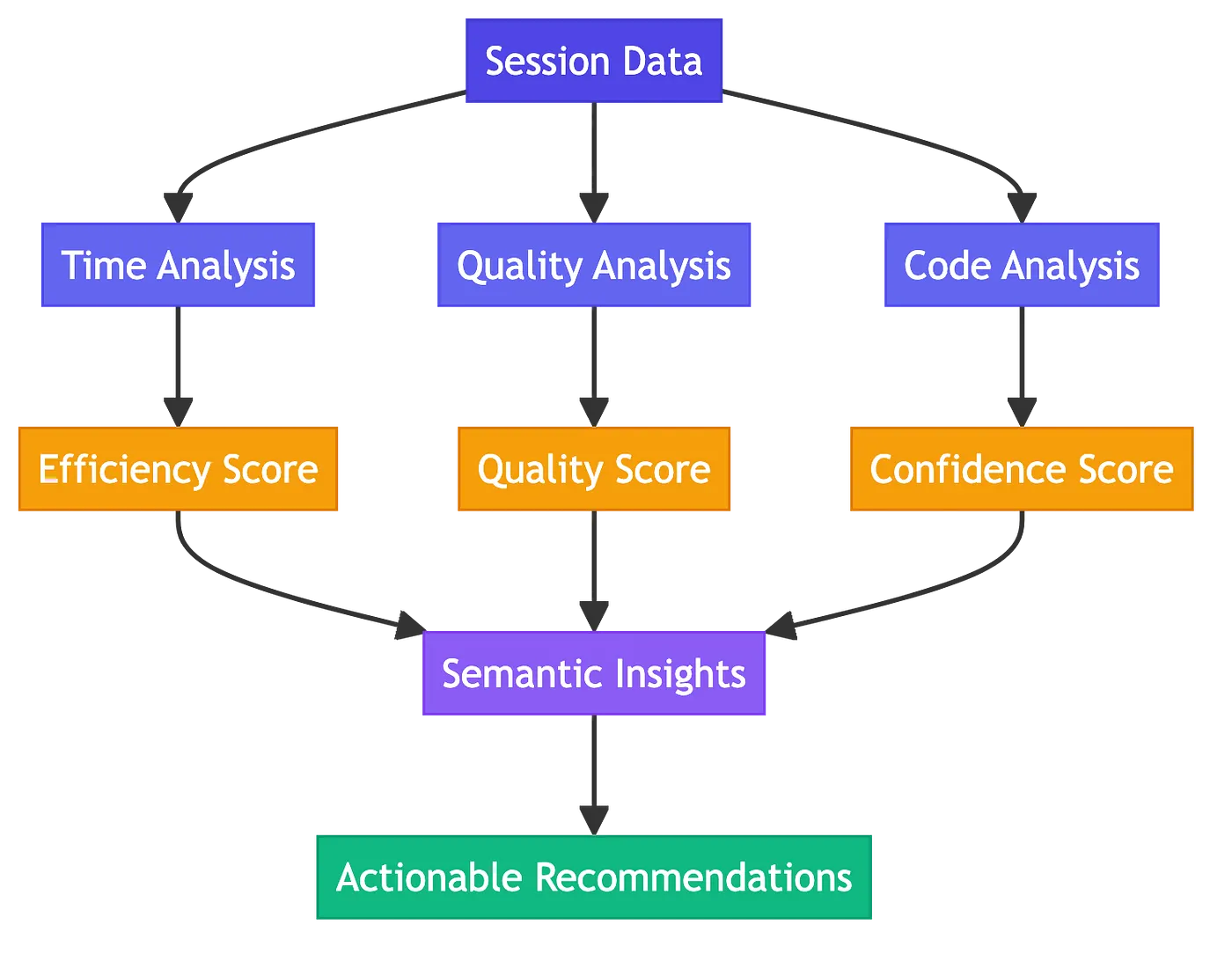
This data helps you decide where to invest: refactor the checkout form, restructure state management, or adjust the agent’s context.
Getting Started
# Install globally
npm install -g @ironbee-ai/cli
# Set up in your project
cd your-project
ironbee install
# That's it. Next time your agent edits code, verification kicks in.
IronBee supports Claude Code and Cursor today, with Codex and OpenCode planned.
Agent Commands
Configuration
IronBee works out of the box but can be customized:
{
    "verifyPatterns": ["*.ts", "*.tsx", "*.css"],
    "ignoredVerifyPatterns": ["*.test.ts", "*.spec.ts"],
    "maxRetries": 5
}
By default, 40+ code file extensions require verification. Non-code files (README, configs) don’t trigger verification.
The Bigger Picture
AI agents are becoming the primary way code gets written. But speed without verification is just fast failure. The question isn’t whether your agent can write code. It’s whether the code actually works.
IronBee makes verification a first-class part of the agentic workflow. Every change tested. Every session measured. Every pattern surfaced.
No more “it should work.”
Get started today: IronBee CLI is open source. Install it with npm install -g @ironbee-ai/cli or check it out on GitHub.
Join the platform waitlist: The IronBee Platform with full observability and intelligence launches mid-May. Sign up for early access at ironbee.ai.